Accessibility for Seniors: A Family Care Guide

Your mother has a shower chair, newly installed grab bars, and a ramp at the front door. Yet she still calls you several times because she can't find the right phone number, forgets how to start the microwave, or becomes distressed after an online appointment portal changes. The house is physically safer, but daily life still feels harder.
That's the central mistake families make with accessibility for seniors. They treat it as a renovation project instead of a system that must support movement, vision, hearing, memory, confidence, communication, and access to help. Physical modifications matter, but they won't restore independence if a person can't understand the next step or reach the service they need.
Table of Contents
Redefining Accessibility Beyond Physical Ramps
The physical and cognitive connection
High-Impact Home Modifications for Daily Living
Start with the bathroom
Make routes obvious
Simplify the kitchen and bedroom
Overcoming Digital and Service Navigation Barriers
Reduce the number of decisions
Treat service navigation as care work
Low-Tech Communication and Cognitive Support
Compare the tool with the task
Build support around familiar routines
Community Access and Transportation Solutions
Match transport to the actual risk
Funding Home Modifications and Ongoing Care
Check the major funding routes
Spend in order of consequence
Building a Layered Accessibility and Care Plan
Begin with a short safety triage
Redefining Accessibility Beyond Physical Ramps
A ramp solves one barrier. It doesn't tell someone with memory loss where to put the keys, how to contact a daughter, or whether an unfamiliar text message is safe to open. Accessibility means reducing friction across the entire day, from getting out of bed to arranging transportation and maintaining contact with other people.
The need is broad, not exceptional. In OECD and EU countries, around one in four people aged 16 and over report a disability that limits everyday activities, and the proportion is much higher among older adults. Just under half of people aged 65 and over report a disability, compared with about 18% of working-age adults, according to the OECD report on accessible housing for people with disabilities. For families caring for an older parent, accessibility isn't a specialist concern. It's a normal part of planning for later life.
The physical and cognitive connection
A person may be able to walk safely through a hallway but still avoid the kitchen because the controls are confusing. Someone with reduced vision may recognize a chair but miss a dark object on a patterned floor. A person with dementia may know how to make tea but lose the sequence when an appliance display contains too many choices.
That's why a useful assessment asks more than, “Can your parent get from room to room?” Ask:
Can they identify the bathroom quickly at night?
Can they operate essential appliances without guesswork?
Can they call for help without remembering a complicated procedure?
Can they understand appointment instructions?
Can they recover from a mistake without panic?
The Americans with Disabilities Act, signed in the United States on July 26, 1990, established broad civil-rights protections covering employment, transportation, public services, public accommodations, and telecommunications. Its legacy, described by AARP's overview of the ADA anniversary, helped make physical and communication access part of mainstream policy. Families should apply that broader principle at home.
Practical rule: If a support requires memory, precision, speed, or confidence that your parent no longer has, it isn't accessible enough.
Use physical changes to prevent injury, then simplify the environment and communication methods around them. A large-print contact card beside the phone, a clearly labeled medication station, and one familiar call routine may protect independence more effectively than another complicated device. Emotional comfort matters too. Repeated confusion and failed attempts can make a capable older adult stop trying, which increases dependence and caregiver workload.
High-Impact Home Modifications for Daily Living
Start with hazards that can cause immediate harm, then address the features that make ordinary tasks difficult. You don't need to renovate every room at once. A focused assessment by an occupational therapist, aging-in-place specialist, or qualified contractor can help distinguish essential work from cosmetic upgrades.
Start with the bathroom
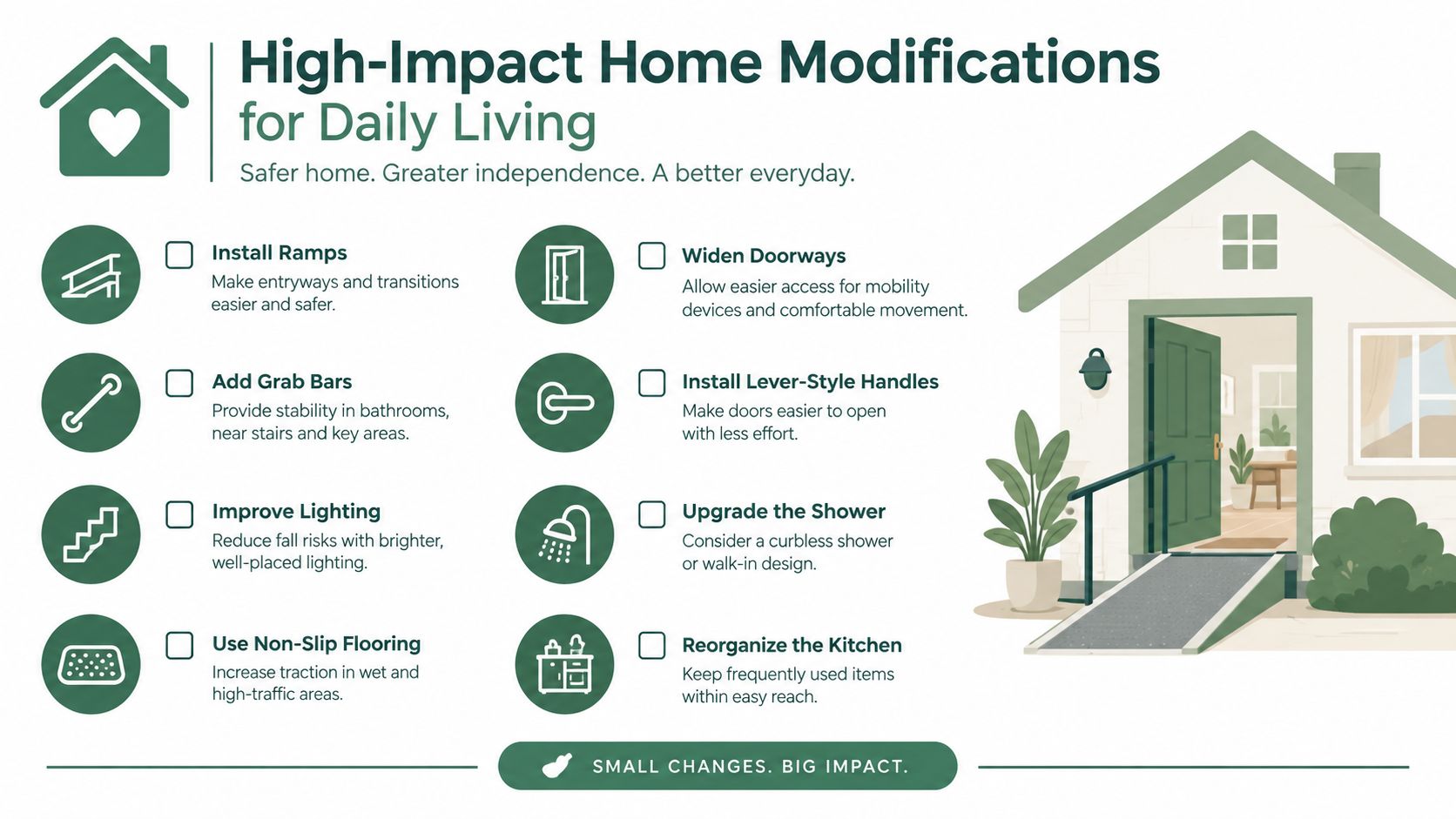
The bathroom deserves priority because water, transfers, tight spaces, and nighttime urgency create several risks at once. A zero-threshold shower removes the need to step over a raised edge. Add a properly installed seat, a handheld showerhead, non-slip flooring, and grab bars positioned for the actual transfer pattern, not just where they look convenient.
Grab bars must be anchored to suitable structural support. Suction-mounted products can be useful in limited situations, but don't treat them as a substitute for professionally secured equipment. A higher toilet, lever-style faucet, and bright, even lighting can further reduce strain.
Make routes obvious
Clear walking paths from the bedroom to the bathroom, kitchen, and main entrance. Remove loose rugs, unstable furniture, trailing cords, and decorative items that narrow the route. Use color contrast deliberately, such as a light toilet seat against a darker background or a strongly contrasting edge on a step.
For practical fall-prevention guidance, families can use this guide to preventing falls in older adults alongside an in-home assessment. The point isn't to make the home sterile. It's to make the important route visually and physically obvious.
Simplify the kitchen and bedroom
Replace complicated appliance controls with models that have clear, tactile settings where possible. Mark the preferred microwave or cooker setting with a high-contrast label. Remove rarely used items from counters and cupboards, because visual clutter can make it harder for someone with memory loss to identify what they need.
In the bedroom, install motion-activated lighting between the bed and bathroom. Keep glasses, a phone, water, and emergency contacts within easy reach. Choose furniture that provides stable hand support without creating narrow passages.
Prioritize safety work before appearance. A beautiful renovation that leaves confusing controls and poor lighting hasn't solved the real problem.
Families should separate tasks they can handle from work requiring licensed professionals. Moving furniture, improving labels, and adding plug-in lighting may be immediate steps. Electrical changes, structural grab-bar installation, shower alterations, ramps, and doorway changes require qualified assessment and installation. Before approving a large project, review the cost of aging in place upgrades to compare likely priorities and trade-offs.
Overcoming Digital and Service Navigation Barriers
A senior may have a suitable home and still lose independence because essential services are difficult to locate or use. Healthcare portals, housing applications, transportation bookings, benefits forms, and banking systems often assume that users can read small text, remember passwords, interpret unfamiliar icons, and recover calmly from an error.
Evidence on older adults and mainstream digital tools points to recurring barriers. A systematic review of digital technology barriers for older adults identified physical device features, busy interfaces, and weak or unreliable signals among the most frequently reported problems. Cognitive impairment was also a commonly reported barrier. These aren't minor inconveniences. They can stop a person from completing a task, then force a family member to take over.
Reduce the number of decisions
For a senior with memory loss, every extra screen creates another opportunity to forget the goal. Use one device for essential communication if possible. Keep only necessary apps on the home screen, enlarge text, increase contrast, and disable distracting notifications. A printed card with the names and purposes of key apps can work better than repeated verbal instructions.
Avoid changing devices because a newer model exists. Stability is an accessibility feature. A qualitative study of technology use among people with dementia identified difficulty finding apps and features, completing tasks under stress or fatigue, and relearning workflows after updates as dominant usability problems. The same research found that heuristic evaluation and user testing uncovered different problems, with user testing alone capturing 50% of unique usability problems. Families should test a system with the actual user, not assume that an apparently simple interface is simple in practice.
Treat service navigation as care work
An inaccessible process can include a form with unclear instructions, a phone tree that doesn't recognize speech, a portal that logs out quickly, or a transportation service that requires several separate bookings. The solution isn't always more technical training. Sometimes it's choosing a provider with telephone support, asking for a paper form, arranging an authorized family contact, or creating a single written checklist.
A care coordination platform can help families organize appointments, tasks, and communication, but only if the senior's role remains clear and manageable. When evaluating a care coordination platform, ask whether it reduces family duplication or adds another account, notification stream, and password to maintain.
A service isn't accessible merely because it has an app. It is accessible when the person can complete the task safely, understand what happened, and get help when something goes wrong.
Low-Tech Communication and Cognitive Support
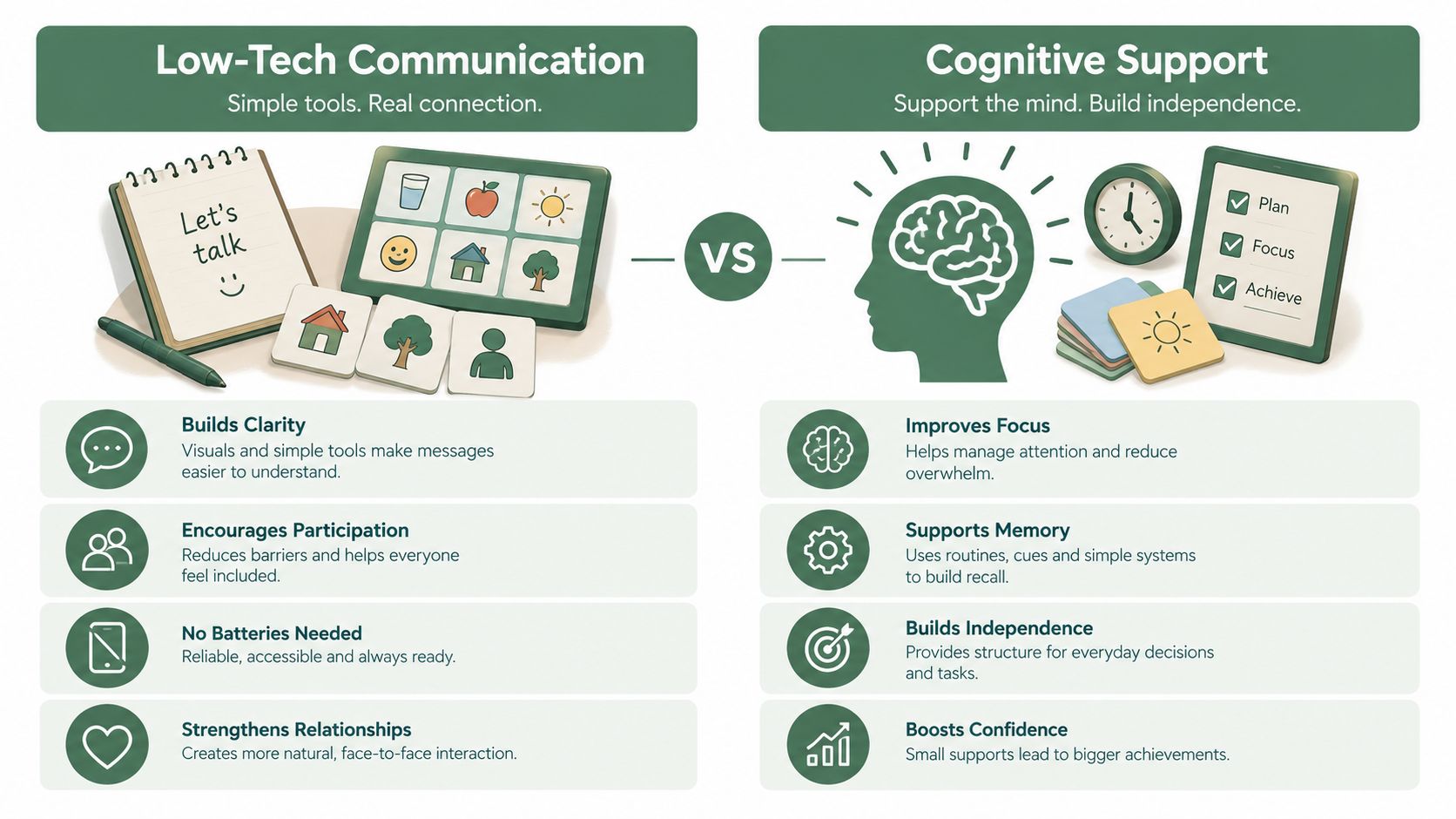
Families often buy a monitoring device when what an older adult needs first is a dependable human conversation. High-tech tools can detect motion, send alerts, track activity, or connect a person to a remote caregiver. They can be valuable, but they also introduce charging, connectivity, privacy, false alarms, and interface problems.
A telephone call has a different trade-off. It may not detect a fall automatically, but it uses a familiar device and can reveal confusion, anxiety, changes in speech, missed routines, or concern about household safety. For many families, that human signal is more useful than a dashboard no one checks consistently.
Compare the tool with the task
Need | High-tech option | Low-tech or phone-based option |
|---|---|---|
Emergency response | Wearable alert or automated detection | Clearly labeled phone contact and agreed call procedure |
Routine reinforcement | App notifications or smart speaker prompts | Scheduled calls and a visible paper routine |
Cognitive engagement | Tablet exercises or digital games | Guided conversation, reminiscence, and verbal tasks |
Family visibility | Dashboard or shared activity log | Call notes and direct updates from a care team |
Adoption barrier | Charging, setup, passwords, and changing interfaces | Familiar telephone with a predictable schedule |
The right choice depends on the person, not the novelty of the product. A senior who refuses an app may answer a phone call reliably. Someone who dislikes being watched may accept a scheduled conversation more readily than a camera. Someone with significant hearing loss may need amplified audio, captions, or another communication method instead.
Build support around familiar routines
Velma is one phone-based option for older adults with early to mid-stage dementia. Its trained care team uses scheduled calls that combine conversation, cognitive exercises, routine reminders, mood support, and practical check-ins about items such as appointments, medication, meals, and household safety. It complements medical treatment and in-person caregiving, rather than replacing either one.
Families considering daily check-in calls for seniors should assess consistency, escalation procedures, documentation, and how the service communicates concerns. A call should have a purpose, but it shouldn't feel like an interrogation. Reminiscence about a familiar job, orientation to the day, or a calm discussion about an upcoming appointment can support participation without making the senior feel tested.
Choose the least complicated tool that reliably supports the task. Familiarity often beats sophistication.
Community Access and Transportation Solutions
A safe home can become a quiet trap if the resident can't reach a clinic, grocery store, faith community, library, or friend. Isolation weakens the very independence families are trying to preserve. It can also make it harder to notice changes in mood, mobility, or cognition.
Treat transportation as part of the care plan, not as a last-minute favor. Contact the local aging agency, transit authority, senior center, and disability services office. Ask specifically about paratransit eligibility, reservation rules, door-to-door assistance, driver training, service boundaries, and what happens when a rider has memory impairment.
Match transport to the actual risk
A senior who walks independently but becomes confused in unfamiliar places may need a consistent route and an escort rather than a vehicle with a lift. Someone with limited balance may need curb-to-curb assistance and enough time for transfers. A volunteer driver program may suit social visits, while medical transportation may be better for appointments with strict arrival requirements.
Write down the details in one visible place:
Booking method: Record the telephone number, lead time, confirmation process, and cancellation rule.
Passenger needs: Note mobility aids, hearing difficulties, communication preferences, and whether an escort is required.
Appointment coordination: Build in time for pickup delays, check-in, and the return journey.
Backup plan: Keep a second option for cancellations, bad weather, or a missed vehicle.
Coordinate transport with in-home care. A caregiver can prepare the bag, confirm the destination, and wait for pickup, while another family member handles the appointment or return call. This division prevents one person from carrying every logistical task.
Don't measure success only by whether your parent reaches a destination. Measure whether they can maintain relationships and meaningful routines with reasonable support. Community participation is a functional accessibility outcome.
Funding Home Modifications and Ongoing Care
Families should assume that some accessibility expenses will require personal funds, while checking every public benefit before paying. Coverage varies by location, eligibility, diagnosis, insurance policy, and the distinction between medical equipment and home improvement.
Check the major funding routes
Medicare may cover eligible medical equipment under specific rules, but it often doesn't pay for broad home renovations just because they make a home easier to use. Ask the prescribing clinician and the plan administrator about covered equipment, documentation, suppliers, and prior authorization.
Medicaid can offer more relevant support through state programs and home- and community-based waivers, depending on eligibility and available services. Contact the state Medicaid office or an aging and disability resource center, and ask about waiting lists, functional assessments, caregiver support, and environmental modifications.
Veterans Affairs benefits may help eligible veterans with certain equipment, home adaptations, or personal care supports. A VA social worker, accredited representative, or local veterans service office can explain which program fits the person's service history and functional needs.
State and local programs may provide repair grants, loan programs, weatherization, transportation, meals, or case management. Start with the local Area Agency on Aging rather than searching randomly online. A case manager can identify programs that families often miss.
Spend in order of consequence
Create three columns: immediate safety, daily function, and convenience. Put secure bathroom equipment, lighting, unsafe flooring, and emergency communication in the first column. Put kitchen simplification, storage changes, and transportation supports in the second. Delay attractive but low-impact upgrades until the essentials are addressed.
Keep records of diagnoses, prescriptions, functional limitations, contractor estimates, receipts, and benefit applications. Many programs require forms to explain what the person can't do safely, not just what equipment the family wants. Ask clinicians to describe the functional problem in concrete terms.
For ongoing cognitive support, compare the service schedule, staff training, family communication, and cancellation terms. A lower-cost service that your parent refuses won't reduce caregiver work. A familiar, reliable support may be worth prioritizing over a more elaborate system that goes unused.
Building a Layered Accessibility and Care Plan
A family usually succeeds by adding supports in stages. Consider a daughter whose father has early memory loss, a recent fall, and growing difficulty with online appointments. Trying to install devices, remodel the bathroom, arrange transport, and teach new software in one week would create resistance for everyone.
Begin with a short safety triage
During the first few days, remove trip hazards, improve the route to the bathroom, place emergency contacts beside the phone, and check that smoke alarms and lighting work. Ask the father to demonstrate important routines instead of relying on his reassurance. Demonstration exposes the steps that have become difficult without turning the assessment into an argument.
In the next phase, stabilize communication. Use one familiar phone, a simple written routine, and scheduled family contact. If a phone-based cognitive support service fits the person and the family, introduce it at a predictable time and explain it as a regular conversation, not a test.
Then address the home in priority order. Secure the bathroom, simplify appliance controls, improve contrast and lighting, and obtain professional advice for structural or electrical changes. Add transportation and service-navigation support after the family understands which appointments and community activities matter most.
Review the plan after meaningful changes, such as a fall, medication change, hospitalization, new confusion, or a failed appointment. Keep a brief record of what happened, what the senior needed, and which support worked. That record helps clinicians, care managers, and family members make decisions based on patterns rather than isolated frustration.
Build around the senior's real day, not the equipment catalogue.
Accessibility also includes administrative readiness. Families managing property, benefits, or a trust should keep documents organized and confirm responsibilities before a crisis. A practical trust administration ending checklist can help clarify closure tasks when a trust is being administered, although legal and financial decisions should be reviewed with the appropriate professional.
The aim isn't to make an older adult dependent on a larger network. It's to remove avoidable obstacles so the person can keep doing the parts of life they can still manage. A layered plan protects safety, preserves choice, and gives caregivers a clearer way to adjust support before exhaustion becomes the family's only planning tool.
Velma provides scheduled phone calls with trained care team members, combining cognitive exercises, companionship, routine reminders, and practical safety check-ins for older adults experiencing early to mid-stage dementia. Visit Velma to see whether familiar phone-based support could help your family reduce daily uncertainty and protect independence at home.
Your mother has a shower chair, newly installed grab bars, and a ramp at the front door. Yet she still calls you several times because she can't find the right phone number, forgets how to start the microwave, or becomes distressed after an online appointment portal changes. The house is physically safer, but daily life still feels harder.
That's the central mistake families make with accessibility for seniors. They treat it as a renovation project instead of a system that must support movement, vision, hearing, memory, confidence, communication, and access to help. Physical modifications matter, but they won't restore independence if a person can't understand the next step or reach the service they need.
Table of Contents
Redefining Accessibility Beyond Physical Ramps
The physical and cognitive connection
High-Impact Home Modifications for Daily Living
Start with the bathroom
Make routes obvious
Simplify the kitchen and bedroom
Overcoming Digital and Service Navigation Barriers
Reduce the number of decisions
Treat service navigation as care work
Low-Tech Communication and Cognitive Support
Compare the tool with the task
Build support around familiar routines
Community Access and Transportation Solutions
Match transport to the actual risk
Funding Home Modifications and Ongoing Care
Check the major funding routes
Spend in order of consequence
Building a Layered Accessibility and Care Plan
Begin with a short safety triage
Redefining Accessibility Beyond Physical Ramps
A ramp solves one barrier. It doesn't tell someone with memory loss where to put the keys, how to contact a daughter, or whether an unfamiliar text message is safe to open. Accessibility means reducing friction across the entire day, from getting out of bed to arranging transportation and maintaining contact with other people.
The need is broad, not exceptional. In OECD and EU countries, around one in four people aged 16 and over report a disability that limits everyday activities, and the proportion is much higher among older adults. Just under half of people aged 65 and over report a disability, compared with about 18% of working-age adults, according to the OECD report on accessible housing for people with disabilities. For families caring for an older parent, accessibility isn't a specialist concern. It's a normal part of planning for later life.
The physical and cognitive connection
A person may be able to walk safely through a hallway but still avoid the kitchen because the controls are confusing. Someone with reduced vision may recognize a chair but miss a dark object on a patterned floor. A person with dementia may know how to make tea but lose the sequence when an appliance display contains too many choices.
That's why a useful assessment asks more than, “Can your parent get from room to room?” Ask:
Can they identify the bathroom quickly at night?
Can they operate essential appliances without guesswork?
Can they call for help without remembering a complicated procedure?
Can they understand appointment instructions?
Can they recover from a mistake without panic?
The Americans with Disabilities Act, signed in the United States on July 26, 1990, established broad civil-rights protections covering employment, transportation, public services, public accommodations, and telecommunications. Its legacy, described by AARP's overview of the ADA anniversary, helped make physical and communication access part of mainstream policy. Families should apply that broader principle at home.
Practical rule: If a support requires memory, precision, speed, or confidence that your parent no longer has, it isn't accessible enough.
Use physical changes to prevent injury, then simplify the environment and communication methods around them. A large-print contact card beside the phone, a clearly labeled medication station, and one familiar call routine may protect independence more effectively than another complicated device. Emotional comfort matters too. Repeated confusion and failed attempts can make a capable older adult stop trying, which increases dependence and caregiver workload.
High-Impact Home Modifications for Daily Living
Start with hazards that can cause immediate harm, then address the features that make ordinary tasks difficult. You don't need to renovate every room at once. A focused assessment by an occupational therapist, aging-in-place specialist, or qualified contractor can help distinguish essential work from cosmetic upgrades.
Start with the bathroom
The bathroom deserves priority because water, transfers, tight spaces, and nighttime urgency create several risks at once. A zero-threshold shower removes the need to step over a raised edge. Add a properly installed seat, a handheld showerhead, non-slip flooring, and grab bars positioned for the actual transfer pattern, not just where they look convenient.
Grab bars must be anchored to suitable structural support. Suction-mounted products can be useful in limited situations, but don't treat them as a substitute for professionally secured equipment. A higher toilet, lever-style faucet, and bright, even lighting can further reduce strain.
Make routes obvious
Clear walking paths from the bedroom to the bathroom, kitchen, and main entrance. Remove loose rugs, unstable furniture, trailing cords, and decorative items that narrow the route. Use color contrast deliberately, such as a light toilet seat against a darker background or a strongly contrasting edge on a step.
For practical fall-prevention guidance, families can use this guide to preventing falls in older adults alongside an in-home assessment. The point isn't to make the home sterile. It's to make the important route visually and physically obvious.
Simplify the kitchen and bedroom
Replace complicated appliance controls with models that have clear, tactile settings where possible. Mark the preferred microwave or cooker setting with a high-contrast label. Remove rarely used items from counters and cupboards, because visual clutter can make it harder for someone with memory loss to identify what they need.
In the bedroom, install motion-activated lighting between the bed and bathroom. Keep glasses, a phone, water, and emergency contacts within easy reach. Choose furniture that provides stable hand support without creating narrow passages.
Prioritize safety work before appearance. A beautiful renovation that leaves confusing controls and poor lighting hasn't solved the real problem.
Families should separate tasks they can handle from work requiring licensed professionals. Moving furniture, improving labels, and adding plug-in lighting may be immediate steps. Electrical changes, structural grab-bar installation, shower alterations, ramps, and doorway changes require qualified assessment and installation. Before approving a large project, review the cost of aging in place upgrades to compare likely priorities and trade-offs.
Overcoming Digital and Service Navigation Barriers
A senior may have a suitable home and still lose independence because essential services are difficult to locate or use. Healthcare portals, housing applications, transportation bookings, benefits forms, and banking systems often assume that users can read small text, remember passwords, interpret unfamiliar icons, and recover calmly from an error.
Evidence on older adults and mainstream digital tools points to recurring barriers. A systematic review of digital technology barriers for older adults identified physical device features, busy interfaces, and weak or unreliable signals among the most frequently reported problems. Cognitive impairment was also a commonly reported barrier. These aren't minor inconveniences. They can stop a person from completing a task, then force a family member to take over.
Reduce the number of decisions
For a senior with memory loss, every extra screen creates another opportunity to forget the goal. Use one device for essential communication if possible. Keep only necessary apps on the home screen, enlarge text, increase contrast, and disable distracting notifications. A printed card with the names and purposes of key apps can work better than repeated verbal instructions.
Avoid changing devices because a newer model exists. Stability is an accessibility feature. A qualitative study of technology use among people with dementia identified difficulty finding apps and features, completing tasks under stress or fatigue, and relearning workflows after updates as dominant usability problems. The same research found that heuristic evaluation and user testing uncovered different problems, with user testing alone capturing 50% of unique usability problems. Families should test a system with the actual user, not assume that an apparently simple interface is simple in practice.
Treat service navigation as care work
An inaccessible process can include a form with unclear instructions, a phone tree that doesn't recognize speech, a portal that logs out quickly, or a transportation service that requires several separate bookings. The solution isn't always more technical training. Sometimes it's choosing a provider with telephone support, asking for a paper form, arranging an authorized family contact, or creating a single written checklist.
A care coordination platform can help families organize appointments, tasks, and communication, but only if the senior's role remains clear and manageable. When evaluating a care coordination platform, ask whether it reduces family duplication or adds another account, notification stream, and password to maintain.
A service isn't accessible merely because it has an app. It is accessible when the person can complete the task safely, understand what happened, and get help when something goes wrong.
Low-Tech Communication and Cognitive Support
Families often buy a monitoring device when what an older adult needs first is a dependable human conversation. High-tech tools can detect motion, send alerts, track activity, or connect a person to a remote caregiver. They can be valuable, but they also introduce charging, connectivity, privacy, false alarms, and interface problems.
A telephone call has a different trade-off. It may not detect a fall automatically, but it uses a familiar device and can reveal confusion, anxiety, changes in speech, missed routines, or concern about household safety. For many families, that human signal is more useful than a dashboard no one checks consistently.
Compare the tool with the task
Need | High-tech option | Low-tech or phone-based option |
|---|---|---|
Emergency response | Wearable alert or automated detection | Clearly labeled phone contact and agreed call procedure |
Routine reinforcement | App notifications or smart speaker prompts | Scheduled calls and a visible paper routine |
Cognitive engagement | Tablet exercises or digital games | Guided conversation, reminiscence, and verbal tasks |
Family visibility | Dashboard or shared activity log | Call notes and direct updates from a care team |
Adoption barrier | Charging, setup, passwords, and changing interfaces | Familiar telephone with a predictable schedule |
The right choice depends on the person, not the novelty of the product. A senior who refuses an app may answer a phone call reliably. Someone who dislikes being watched may accept a scheduled conversation more readily than a camera. Someone with significant hearing loss may need amplified audio, captions, or another communication method instead.
Build support around familiar routines
Velma is one phone-based option for older adults with early to mid-stage dementia. Its trained care team uses scheduled calls that combine conversation, cognitive exercises, routine reminders, mood support, and practical check-ins about items such as appointments, medication, meals, and household safety. It complements medical treatment and in-person caregiving, rather than replacing either one.
Families considering daily check-in calls for seniors should assess consistency, escalation procedures, documentation, and how the service communicates concerns. A call should have a purpose, but it shouldn't feel like an interrogation. Reminiscence about a familiar job, orientation to the day, or a calm discussion about an upcoming appointment can support participation without making the senior feel tested.
Choose the least complicated tool that reliably supports the task. Familiarity often beats sophistication.
Community Access and Transportation Solutions
A safe home can become a quiet trap if the resident can't reach a clinic, grocery store, faith community, library, or friend. Isolation weakens the very independence families are trying to preserve. It can also make it harder to notice changes in mood, mobility, or cognition.
Treat transportation as part of the care plan, not as a last-minute favor. Contact the local aging agency, transit authority, senior center, and disability services office. Ask specifically about paratransit eligibility, reservation rules, door-to-door assistance, driver training, service boundaries, and what happens when a rider has memory impairment.
Match transport to the actual risk
A senior who walks independently but becomes confused in unfamiliar places may need a consistent route and an escort rather than a vehicle with a lift. Someone with limited balance may need curb-to-curb assistance and enough time for transfers. A volunteer driver program may suit social visits, while medical transportation may be better for appointments with strict arrival requirements.
Write down the details in one visible place:
Booking method: Record the telephone number, lead time, confirmation process, and cancellation rule.
Passenger needs: Note mobility aids, hearing difficulties, communication preferences, and whether an escort is required.
Appointment coordination: Build in time for pickup delays, check-in, and the return journey.
Backup plan: Keep a second option for cancellations, bad weather, or a missed vehicle.
Coordinate transport with in-home care. A caregiver can prepare the bag, confirm the destination, and wait for pickup, while another family member handles the appointment or return call. This division prevents one person from carrying every logistical task.
Don't measure success only by whether your parent reaches a destination. Measure whether they can maintain relationships and meaningful routines with reasonable support. Community participation is a functional accessibility outcome.
Funding Home Modifications and Ongoing Care
Families should assume that some accessibility expenses will require personal funds, while checking every public benefit before paying. Coverage varies by location, eligibility, diagnosis, insurance policy, and the distinction between medical equipment and home improvement.
Check the major funding routes
Medicare may cover eligible medical equipment under specific rules, but it often doesn't pay for broad home renovations just because they make a home easier to use. Ask the prescribing clinician and the plan administrator about covered equipment, documentation, suppliers, and prior authorization.
Medicaid can offer more relevant support through state programs and home- and community-based waivers, depending on eligibility and available services. Contact the state Medicaid office or an aging and disability resource center, and ask about waiting lists, functional assessments, caregiver support, and environmental modifications.
Veterans Affairs benefits may help eligible veterans with certain equipment, home adaptations, or personal care supports. A VA social worker, accredited representative, or local veterans service office can explain which program fits the person's service history and functional needs.
State and local programs may provide repair grants, loan programs, weatherization, transportation, meals, or case management. Start with the local Area Agency on Aging rather than searching randomly online. A case manager can identify programs that families often miss.
Spend in order of consequence
Create three columns: immediate safety, daily function, and convenience. Put secure bathroom equipment, lighting, unsafe flooring, and emergency communication in the first column. Put kitchen simplification, storage changes, and transportation supports in the second. Delay attractive but low-impact upgrades until the essentials are addressed.
Keep records of diagnoses, prescriptions, functional limitations, contractor estimates, receipts, and benefit applications. Many programs require forms to explain what the person can't do safely, not just what equipment the family wants. Ask clinicians to describe the functional problem in concrete terms.
For ongoing cognitive support, compare the service schedule, staff training, family communication, and cancellation terms. A lower-cost service that your parent refuses won't reduce caregiver work. A familiar, reliable support may be worth prioritizing over a more elaborate system that goes unused.
Building a Layered Accessibility and Care Plan
A family usually succeeds by adding supports in stages. Consider a daughter whose father has early memory loss, a recent fall, and growing difficulty with online appointments. Trying to install devices, remodel the bathroom, arrange transport, and teach new software in one week would create resistance for everyone.
Begin with a short safety triage
During the first few days, remove trip hazards, improve the route to the bathroom, place emergency contacts beside the phone, and check that smoke alarms and lighting work. Ask the father to demonstrate important routines instead of relying on his reassurance. Demonstration exposes the steps that have become difficult without turning the assessment into an argument.
In the next phase, stabilize communication. Use one familiar phone, a simple written routine, and scheduled family contact. If a phone-based cognitive support service fits the person and the family, introduce it at a predictable time and explain it as a regular conversation, not a test.
Then address the home in priority order. Secure the bathroom, simplify appliance controls, improve contrast and lighting, and obtain professional advice for structural or electrical changes. Add transportation and service-navigation support after the family understands which appointments and community activities matter most.
Review the plan after meaningful changes, such as a fall, medication change, hospitalization, new confusion, or a failed appointment. Keep a brief record of what happened, what the senior needed, and which support worked. That record helps clinicians, care managers, and family members make decisions based on patterns rather than isolated frustration.
Build around the senior's real day, not the equipment catalogue.
Accessibility also includes administrative readiness. Families managing property, benefits, or a trust should keep documents organized and confirm responsibilities before a crisis. A practical trust administration ending checklist can help clarify closure tasks when a trust is being administered, although legal and financial decisions should be reviewed with the appropriate professional.
The aim isn't to make an older adult dependent on a larger network. It's to remove avoidable obstacles so the person can keep doing the parts of life they can still manage. A layered plan protects safety, preserves choice, and gives caregivers a clearer way to adjust support before exhaustion becomes the family's only planning tool.
Velma provides scheduled phone calls with trained care team members, combining cognitive exercises, companionship, routine reminders, and practical safety check-ins for older adults experiencing early to mid-stage dementia. Visit Velma to see whether familiar phone-based support could help your family reduce daily uncertainty and protect independence at home.
Suggested Article: