How to Organize Medical Records for Older Parents

The ER nurse asked for my dad's medication list, allergies, cardiologist, and last hospital discharge summary. Dad couldn't answer. I had the information somewhere, but not where I needed it. The binder was thick, color-coded, and carefully arranged. It still failed us.
That night changed how I think about how to organize medical records for an older parent. The goal isn't a beautiful archive that nobody can use under pressure. The goal is a small, current set of facts that a parent, caregiver, sibling, or clinician can find quickly, then a separate archive for everything else. Every new document gets processed within 24 hours, because outdated information is often more dangerous than messy information.
Table of Contents
The Moment the Binder Stops Working
Decide What Stays Current and What Gets Archived
Tier one is the live-access set
Tier two is the archive
Build a Folder Structure That Survives Memory Loss
Mirror the paper system digitally
Scan, Name, and Refresh Files Within 24 Hours
Make the 24-hour rule visible
Pick the Right Mix of Paper and Digital Storage
Share Records Safely With Family and Clinicians
Keep the System Working With a Monthly Habit
The Moment the Binder Stops Working
My dad's binder looked responsible. It had tabs, plastic sleeves, old lab reports, hospital paperwork, medication printouts, and notes from specialists. It also had three versions of his medication list, two of them outdated. The current list was buried behind a physical therapy summary from months earlier.
At the ER, Dad couldn't name his cardiologist or explain which pill he'd stopped taking. He couldn't point to the allergy page because he couldn't remember that the binder had one. I was trying to answer questions while searching through pages, calling my sister, and remembering a refill that had been missed earlier that week.
The second failure was quieter. I had become the family's medical brain without anyone formally deciding that I would. I knew which doctor had changed the dose, which pharmacy had called, and which test result we were still waiting for. My siblings wanted to help, but they were in different states and were working from old screenshots, partial portal messages, and memories of conversations they hadn't attended.
The problem wasn't that our binder lacked information. It contained too much information without a current front door.
Medical record organization has changed dramatically over time. Patient documentation goes back about 3,000 years, paper records weren't steadily used until roughly 1900–1920, and computerized medical records began attracting serious attention in the 1960s, according to this history of electronic health records. HIPAA, signed into law on August 21, 1996, established national privacy and security standards for health information, while later federal efforts helped push electronic records into routine care.
Today, families still have to connect information across specialists, hospitals, pharmacies, paper handouts, and patient portals. If you're collecting records from several offices, it may help to compare medical records retrieval vendors rather than chase every request yourself.
A shared care system can also reduce the burden on one exhausted person. Families coordinating appointments, tasks, and updates may benefit from a care coordination platform, but the organizing principle has to come first: keep the information needed for the next day of care current, and move the rest out of the way.
Decide What Stays Current and What Gets Archived
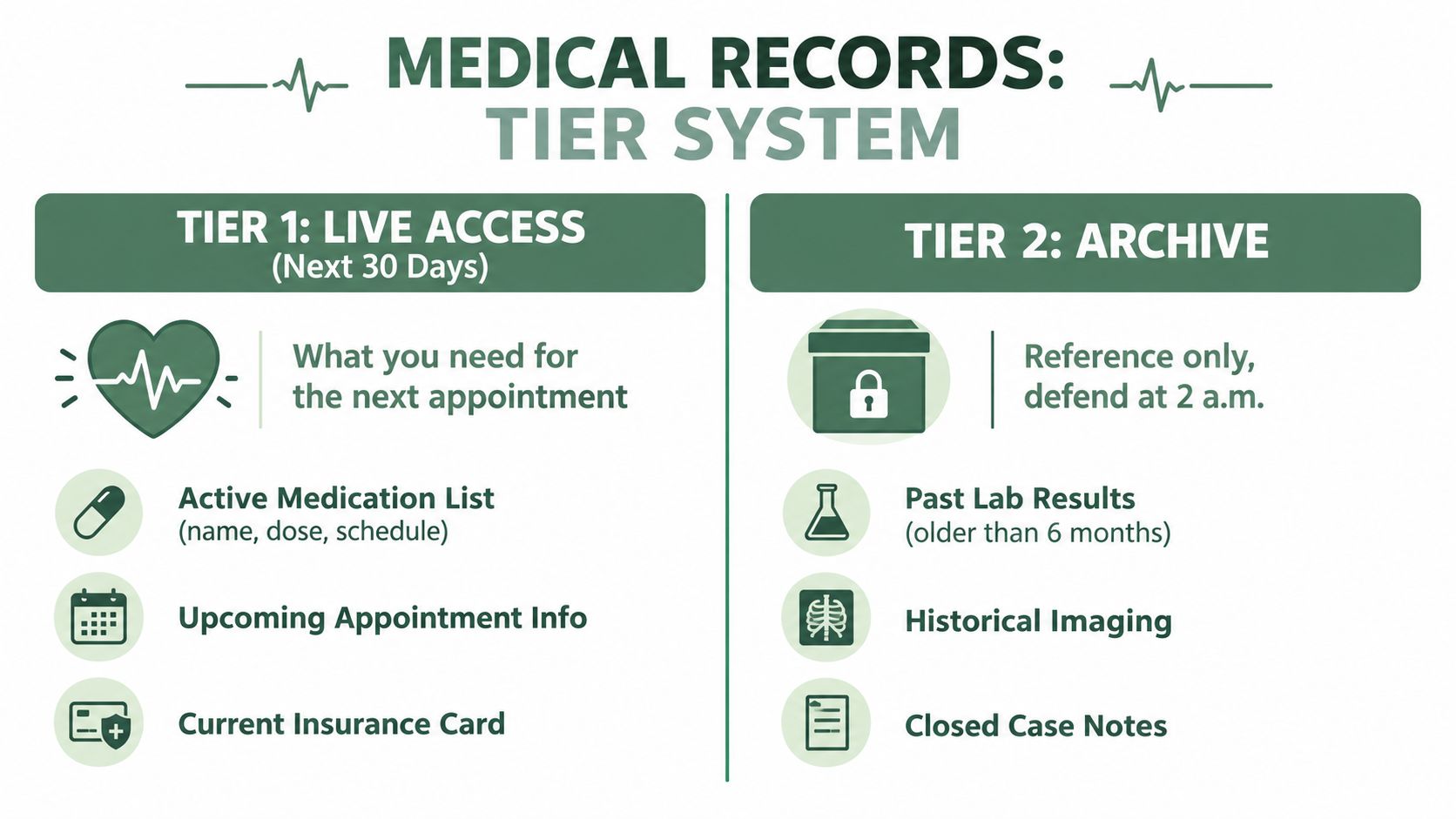
Start with two tiers. Don't create ten categories before deciding what must be visible at an emergency visit.
Tier one is the live-access set
This set covers what can change behavior during the current month:
Medications now: Include each active medication, dose, schedule, reason for use, prescribing clinician, and pharmacy.
Current conditions: List the diagnoses that affect present care, with a short plain-language explanation.
Allergies and reactions: Record the substance and the reaction, not just the word “allergy.”
Recent clinical information: Keep recent specialist notes, test results that are still pending action, and the latest visit summaries.
Immediate logistics: Add upcoming appointments, insurance information, the primary pharmacy number, key provider contacts, and the advance directive.
Tier two is the archive
The archive holds historical labs, resolved imaging, paid billing records, prior procedures, and medication trials that no longer guide current decisions. Keep it searchable, dated, and separate from the live set.
Use one firm rule: if a document doesn't change behavior this month, archive it. That doesn't mean destroy it. It means stop forcing a parent or caregiver to search through it during a stressful visit.
Boundary cases need judgment. A pending biopsy result stays live until someone reviews it and records the next action. A completed physical therapy series moves to the archive once there are no remaining visits, instructions, or follow-up decisions. A recently changed medication stays live even if the prescription paperwork looks routine.
The payoff is practical. Your parent or aide can carry a thin current set to an appointment instead of hauling the family's entire medical history. Keep financial paperwork separate from clinical records, and use this guide to financial management for elderly family members for the money side of caregiving.
Build a Folder Structure That Survives Memory Loss
Use the same structure on paper and digitally. Familiar labels reduce the mental work required to find information, especially when someone has early dementia and can't reliably remember where a document belongs.
For the physical binder, use five tabs in this exact order:
Emergency Card
Medications Now
Active Conditions
This Month's Visits
Contacts and Insurance
Keep one to three pages per tab. Print them on bright paper so the important pages stand out from ordinary paperwork. The Emergency Card should include the parent's name, date of birth, allergies, essential diagnoses, emergency contacts, primary physician, and a brief instruction telling a responder where the full digital record lives.
The Medications Now tab should contain only the current list. Don't leave old prescriptions behind “for reference.” Old medication trials belong in the archive, clearly labeled as inactive.
Mirror the paper system digitally
Create a shared drive with these top-level folders:
01 Emergency Card
02 Medications Now
03 Active Conditions
04 This Month's Visits
05 Contacts and Insurance
Archive
Inside Archive, create dated year folders. Use one filename rule for every document:
YYYY-MM-DD_Category_Doctor
For example: 2026-02-14_LipidPanel_DrReyes.
A single-page laminated index taped inside the binder lid should list every tab and the matching digital folder. That index matters when a sibling, home aide, or hospital staff member has the binder but not the cloud link.
Five tabs is the ceiling for someone with memory loss. Six may sound manageable to you, but extra categories create another decision. Don't organize for the person who designed the binder. Organize for the person who has to use it while confused, tired, or frightened.
Five clear choices beat a “complete” system that requires interpretation.
The same principle applies outside healthcare. If you're building repeatable filing habits for a family business or care agency, resources on how to streamline small business document workflows can help you think through shared naming, access, and document routing. For the parent, keep the physical structure simple and support it with executive function support, not more paperwork.
Scan, Name, and Refresh Files Within 24 Hours
Every document needs a predictable name before it enters the system. Use:
YYYY-MM-DD_Category_DocumentSource
A cardiology note from Dr. Reyes dated March 14, 2024 becomes:
2024-03-14_Cardiology_Note_Reyes
Put the date first. That lets files sort chronologically without opening them. Use specific categories such as Cardiology, Lab, Imaging, Medication, Discharge, or Insurance. Never use labels like “hospital stuff,” “new papers,” or “miscellaneous.” Those names hide the information you'll later search for.
A phone-based scanner is enough for ordinary paperwork. Set it to 200–300 dpi grayscale when that produces a readable document, and use color when a color-coded form or identification card requires it. Send every new scan to one inbox folder first, then sort it into the matching Tier 1 or Archive folder.
Make the 24-hour rule visible
Suppose Mom sees her cardiologist on Tuesday. She comes home with a printed visit summary, an after-visit summary, a portal PDF, and an updated medication list. By Wednesday morning, all four documents should be scanned, named, and filed in the appropriate category. The paper originals go into a dated manila sleeve until you've confirmed the digital copies are readable and complete.
The 24-hour limit is a ceiling, not a target. If you can process the paperwork before dinner, do it. Delay creates duplicate files, forgotten instructions, and medication lists that no longer match reality.
The clinical record itself should support reliable care. Entries need a date, time, legible content, signature, and prompt documentation, while useful notes include the reason for the visit, relevant findings, abnormal tests, diagnosis, and management plan, as described in this clinical record-keeping guidance.

After scanning, confirm that the file opens, the page order is correct, and the date and source are clear. Then shred duplicates and route the original according to your retention policy. Don't delete anything while you're still uncertain whether it records an active decision.
Pick the Right Mix of Paper and Digital Storage
For early to mid-stage dementia care, storage should be judged by what happens during an urgent visit, not by what looks elegant on a computer. Paper is visible and works without a login. Digital files are searchable and easier to share. Neither works well alone when one person has memory loss and several caregivers need dependable access.
Criterion | Paper-Only | Digital-Only | Hybrid (Recommended) |
|---|---|---|---|
Portability in an emergency | Easy to grab, but only if it's nearby | Useful if the phone has power and access | Critical facts travel on paper, archive stays digital |
Resistance to confusion | Familiar and tangible | Searchable, but passwords and folders can frustrate | Simple binder plus searchable backup |
Grab-and-go for family | Works for whoever has it | Works for authorized users anywhere | Supports both bedside and remote caregivers |
Cost | Low after setup | Depends on storage and scanning tools | Requires both, but keeps each system small |
Recovery after loss | Vulnerable to fire, water, or misplacement | Vulnerable to lost devices or account problems | One format can restore the other |
My recommendation is a slim one-inch live-access binder paired with a cloud folder that mirrors it. The binder should hold the current medication list, active specialists, insurance cards, advance directive, emergency contacts, and the latest two visit summaries. The cloud folder should hold the same current set plus the complete archive.
Don't put the full immunization history, decade-old imaging, or every lab result since 2010 in the binder. Those documents belong in the archive. But don't keep the advance directive only in the cloud either. A paramedic or hospital team may need that document before anyone can log in.
U.S. hospitals' use of electronic health record systems has become mainstream, with one summary reporting adoption at over 96%, compared with 9% in 2008, as documented by the National Library of Medicine discussion of medical record systems. That digital infrastructure helps, but it doesn't remove the need for a family-held current summary.
Share Records Safely With Family and Clinicians
Sharing a record doesn't mean giving everyone the same power. Name the people, assign their roles, and decide who can view, upload, edit, or revoke access.
A practical arrangement looks like this:
Primary caregiver spouse: Full edit rights to the shared cloud folder and delegated access through the parent's patient portals.
Out-of-state adult child: View-only access to the main folder, plus permission to upload new documents into a clearly labeled intake folder.
Power of attorney agent: Access to a protected folder containing the advance directive, insurance information, emergency contacts, and related authority documents.
Clinicians: Access through their own portal or a secure file-sharing method, not through the family's master password.
Ask each clinic how to request proxy or caregiver portal access. The process may involve the parent's consent, an authorization form, or documentation of legal authority. If your parent can still participate in the decision, include them in the conversation. If a hospitalization changes who coordinates care, review access and revoke permissions that no longer fit.
Never text a shared password. Don't email an unrestricted folder link. Use individual accounts, strong passwords, two-factor authentication, and view-only permissions wherever editing isn't necessary. If a family member needs to contribute, give them an upload route rather than permission to reorganize the entire system.

For appointments, bring the live-access binder and open the mirrored digital folder on a phone or tablet. Don't bring the full archive unless the clinician asks for a specific historical item. Flooding a short visit with irrelevant paperwork makes it harder to identify the current issue.
Tools that turn paper into searchable PDFs can help with this workflow. If you're evaluating options, review medical PDF tools from PDFWix, then choose a method that lets you control permissions and keep one canonical copy.
Review access on a regular schedule:
Confirm who has edit rights.
Remove access for former caregivers or outdated accounts.
Check that the parent's portal proxy permissions still reflect current roles.
Test one shared file from each caregiver's account.
Confirm that the advance directive and emergency card remain available to the people who need them.
Keep the System Working With a Monthly Habit
A records system survives because someone maintains it during ordinary weeks. Pick one Sunday morning and run a short review. Print the current medication list, compare it with the pharmacy fill history, flag duplicates or unexplained gaps, and check that the digital mirror matches the binder.
Then review Tier 1. Remove appointments that have passed, move completed visit summaries to the archive, and add the next action for every pending test or referral. Apply the naming rule to anything sitting in the digital inbox. Confirm that the cloud backup is current and that the emergency card still reflects reality.
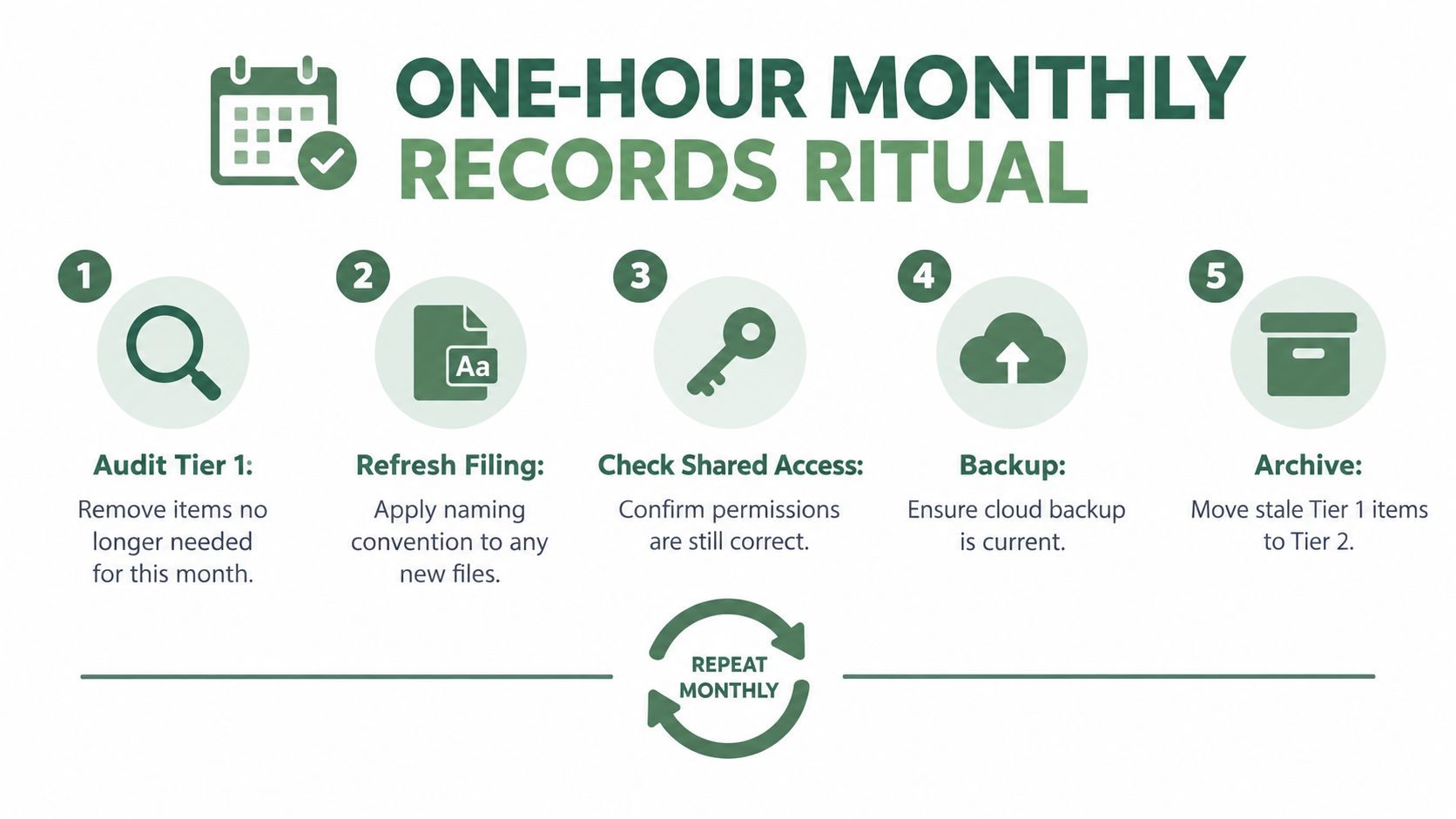
Assign ownership instead of assuming everyone will help:
One adult child owns the binder: They replace outdated pages and bring the live set to visits.
Another owns portal access: They manage proxy permissions, downloads, and new uploads.
A third handles the quarterly deep clean: They move stale Tier 1 files into the dated archive and check for duplicates.
An out-of-cycle refresh happens after a new specialist, hospitalization, medication change, or missed dose. Don't wait for the monthly ritual after any of those events. Apply the 24-hour rule, update the medication snapshot, and tell the other caregivers what changed.
When the system breaks, reconstruct it from the pharmacy, primary care office, specialists, hospital medical-records departments, and patient portals. Ask for current medication information first, then emergency contacts, allergies, active diagnoses, recent notes, and pending results. Rebuild the live set before chasing historical documents.
A simple redesign can make electronic records easier to access and use. In a WHO electronic medical record redesign study, clinicians who found order selection difficult fell from 31% to 21%, while monthly technical issues fell from 30 to 1.4, according to the WHO EMR redesign report. The lesson for families is straightforward: predictable categories and regular cleanup matter more than elaborate systems.
Velma offers scheduled phone calls, cognitive exercises, companionship, practical reminders, and care-manager coordination for older adults experiencing memory loss. If your parent needs consistent support with appointments, medications, routines, and day-to-day confidence, visit Velma to learn how its phone-based program can complement your family's medical-record system.
The ER nurse asked for my dad's medication list, allergies, cardiologist, and last hospital discharge summary. Dad couldn't answer. I had the information somewhere, but not where I needed it. The binder was thick, color-coded, and carefully arranged. It still failed us.
That night changed how I think about how to organize medical records for an older parent. The goal isn't a beautiful archive that nobody can use under pressure. The goal is a small, current set of facts that a parent, caregiver, sibling, or clinician can find quickly, then a separate archive for everything else. Every new document gets processed within 24 hours, because outdated information is often more dangerous than messy information.
Table of Contents
The Moment the Binder Stops Working
Decide What Stays Current and What Gets Archived
Tier one is the live-access set
Tier two is the archive
Build a Folder Structure That Survives Memory Loss
Mirror the paper system digitally
Scan, Name, and Refresh Files Within 24 Hours
Make the 24-hour rule visible
Pick the Right Mix of Paper and Digital Storage
Share Records Safely With Family and Clinicians
Keep the System Working With a Monthly Habit
The Moment the Binder Stops Working
My dad's binder looked responsible. It had tabs, plastic sleeves, old lab reports, hospital paperwork, medication printouts, and notes from specialists. It also had three versions of his medication list, two of them outdated. The current list was buried behind a physical therapy summary from months earlier.
At the ER, Dad couldn't name his cardiologist or explain which pill he'd stopped taking. He couldn't point to the allergy page because he couldn't remember that the binder had one. I was trying to answer questions while searching through pages, calling my sister, and remembering a refill that had been missed earlier that week.
The second failure was quieter. I had become the family's medical brain without anyone formally deciding that I would. I knew which doctor had changed the dose, which pharmacy had called, and which test result we were still waiting for. My siblings wanted to help, but they were in different states and were working from old screenshots, partial portal messages, and memories of conversations they hadn't attended.
The problem wasn't that our binder lacked information. It contained too much information without a current front door.
Medical record organization has changed dramatically over time. Patient documentation goes back about 3,000 years, paper records weren't steadily used until roughly 1900–1920, and computerized medical records began attracting serious attention in the 1960s, according to this history of electronic health records. HIPAA, signed into law on August 21, 1996, established national privacy and security standards for health information, while later federal efforts helped push electronic records into routine care.
Today, families still have to connect information across specialists, hospitals, pharmacies, paper handouts, and patient portals. If you're collecting records from several offices, it may help to compare medical records retrieval vendors rather than chase every request yourself.
A shared care system can also reduce the burden on one exhausted person. Families coordinating appointments, tasks, and updates may benefit from a care coordination platform, but the organizing principle has to come first: keep the information needed for the next day of care current, and move the rest out of the way.
Decide What Stays Current and What Gets Archived
Start with two tiers. Don't create ten categories before deciding what must be visible at an emergency visit.
Tier one is the live-access set
This set covers what can change behavior during the current month:
Medications now: Include each active medication, dose, schedule, reason for use, prescribing clinician, and pharmacy.
Current conditions: List the diagnoses that affect present care, with a short plain-language explanation.
Allergies and reactions: Record the substance and the reaction, not just the word “allergy.”
Recent clinical information: Keep recent specialist notes, test results that are still pending action, and the latest visit summaries.
Immediate logistics: Add upcoming appointments, insurance information, the primary pharmacy number, key provider contacts, and the advance directive.
Tier two is the archive
The archive holds historical labs, resolved imaging, paid billing records, prior procedures, and medication trials that no longer guide current decisions. Keep it searchable, dated, and separate from the live set.
Use one firm rule: if a document doesn't change behavior this month, archive it. That doesn't mean destroy it. It means stop forcing a parent or caregiver to search through it during a stressful visit.
Boundary cases need judgment. A pending biopsy result stays live until someone reviews it and records the next action. A completed physical therapy series moves to the archive once there are no remaining visits, instructions, or follow-up decisions. A recently changed medication stays live even if the prescription paperwork looks routine.
The payoff is practical. Your parent or aide can carry a thin current set to an appointment instead of hauling the family's entire medical history. Keep financial paperwork separate from clinical records, and use this guide to financial management for elderly family members for the money side of caregiving.
Build a Folder Structure That Survives Memory Loss
Use the same structure on paper and digitally. Familiar labels reduce the mental work required to find information, especially when someone has early dementia and can't reliably remember where a document belongs.
For the physical binder, use five tabs in this exact order:
Emergency Card
Medications Now
Active Conditions
This Month's Visits
Contacts and Insurance
Keep one to three pages per tab. Print them on bright paper so the important pages stand out from ordinary paperwork. The Emergency Card should include the parent's name, date of birth, allergies, essential diagnoses, emergency contacts, primary physician, and a brief instruction telling a responder where the full digital record lives.
The Medications Now tab should contain only the current list. Don't leave old prescriptions behind “for reference.” Old medication trials belong in the archive, clearly labeled as inactive.
Mirror the paper system digitally
Create a shared drive with these top-level folders:
01 Emergency Card
02 Medications Now
03 Active Conditions
04 This Month's Visits
05 Contacts and Insurance
Archive
Inside Archive, create dated year folders. Use one filename rule for every document:
YYYY-MM-DD_Category_Doctor
For example: 2026-02-14_LipidPanel_DrReyes.
A single-page laminated index taped inside the binder lid should list every tab and the matching digital folder. That index matters when a sibling, home aide, or hospital staff member has the binder but not the cloud link.
Five tabs is the ceiling for someone with memory loss. Six may sound manageable to you, but extra categories create another decision. Don't organize for the person who designed the binder. Organize for the person who has to use it while confused, tired, or frightened.
Five clear choices beat a “complete” system that requires interpretation.
The same principle applies outside healthcare. If you're building repeatable filing habits for a family business or care agency, resources on how to streamline small business document workflows can help you think through shared naming, access, and document routing. For the parent, keep the physical structure simple and support it with executive function support, not more paperwork.
Scan, Name, and Refresh Files Within 24 Hours
Every document needs a predictable name before it enters the system. Use:
YYYY-MM-DD_Category_DocumentSource
A cardiology note from Dr. Reyes dated March 14, 2024 becomes:
2024-03-14_Cardiology_Note_Reyes
Put the date first. That lets files sort chronologically without opening them. Use specific categories such as Cardiology, Lab, Imaging, Medication, Discharge, or Insurance. Never use labels like “hospital stuff,” “new papers,” or “miscellaneous.” Those names hide the information you'll later search for.
A phone-based scanner is enough for ordinary paperwork. Set it to 200–300 dpi grayscale when that produces a readable document, and use color when a color-coded form or identification card requires it. Send every new scan to one inbox folder first, then sort it into the matching Tier 1 or Archive folder.
Make the 24-hour rule visible
Suppose Mom sees her cardiologist on Tuesday. She comes home with a printed visit summary, an after-visit summary, a portal PDF, and an updated medication list. By Wednesday morning, all four documents should be scanned, named, and filed in the appropriate category. The paper originals go into a dated manila sleeve until you've confirmed the digital copies are readable and complete.
The 24-hour limit is a ceiling, not a target. If you can process the paperwork before dinner, do it. Delay creates duplicate files, forgotten instructions, and medication lists that no longer match reality.
The clinical record itself should support reliable care. Entries need a date, time, legible content, signature, and prompt documentation, while useful notes include the reason for the visit, relevant findings, abnormal tests, diagnosis, and management plan, as described in this clinical record-keeping guidance.
After scanning, confirm that the file opens, the page order is correct, and the date and source are clear. Then shred duplicates and route the original according to your retention policy. Don't delete anything while you're still uncertain whether it records an active decision.
Pick the Right Mix of Paper and Digital Storage
For early to mid-stage dementia care, storage should be judged by what happens during an urgent visit, not by what looks elegant on a computer. Paper is visible and works without a login. Digital files are searchable and easier to share. Neither works well alone when one person has memory loss and several caregivers need dependable access.
Criterion | Paper-Only | Digital-Only | Hybrid (Recommended) |
|---|---|---|---|
Portability in an emergency | Easy to grab, but only if it's nearby | Useful if the phone has power and access | Critical facts travel on paper, archive stays digital |
Resistance to confusion | Familiar and tangible | Searchable, but passwords and folders can frustrate | Simple binder plus searchable backup |
Grab-and-go for family | Works for whoever has it | Works for authorized users anywhere | Supports both bedside and remote caregivers |
Cost | Low after setup | Depends on storage and scanning tools | Requires both, but keeps each system small |
Recovery after loss | Vulnerable to fire, water, or misplacement | Vulnerable to lost devices or account problems | One format can restore the other |
My recommendation is a slim one-inch live-access binder paired with a cloud folder that mirrors it. The binder should hold the current medication list, active specialists, insurance cards, advance directive, emergency contacts, and the latest two visit summaries. The cloud folder should hold the same current set plus the complete archive.
Don't put the full immunization history, decade-old imaging, or every lab result since 2010 in the binder. Those documents belong in the archive. But don't keep the advance directive only in the cloud either. A paramedic or hospital team may need that document before anyone can log in.
U.S. hospitals' use of electronic health record systems has become mainstream, with one summary reporting adoption at over 96%, compared with 9% in 2008, as documented by the National Library of Medicine discussion of medical record systems. That digital infrastructure helps, but it doesn't remove the need for a family-held current summary.
Share Records Safely With Family and Clinicians
Sharing a record doesn't mean giving everyone the same power. Name the people, assign their roles, and decide who can view, upload, edit, or revoke access.
A practical arrangement looks like this:
Primary caregiver spouse: Full edit rights to the shared cloud folder and delegated access through the parent's patient portals.
Out-of-state adult child: View-only access to the main folder, plus permission to upload new documents into a clearly labeled intake folder.
Power of attorney agent: Access to a protected folder containing the advance directive, insurance information, emergency contacts, and related authority documents.
Clinicians: Access through their own portal or a secure file-sharing method, not through the family's master password.
Ask each clinic how to request proxy or caregiver portal access. The process may involve the parent's consent, an authorization form, or documentation of legal authority. If your parent can still participate in the decision, include them in the conversation. If a hospitalization changes who coordinates care, review access and revoke permissions that no longer fit.
Never text a shared password. Don't email an unrestricted folder link. Use individual accounts, strong passwords, two-factor authentication, and view-only permissions wherever editing isn't necessary. If a family member needs to contribute, give them an upload route rather than permission to reorganize the entire system.
For appointments, bring the live-access binder and open the mirrored digital folder on a phone or tablet. Don't bring the full archive unless the clinician asks for a specific historical item. Flooding a short visit with irrelevant paperwork makes it harder to identify the current issue.
Tools that turn paper into searchable PDFs can help with this workflow. If you're evaluating options, review medical PDF tools from PDFWix, then choose a method that lets you control permissions and keep one canonical copy.
Review access on a regular schedule:
Confirm who has edit rights.
Remove access for former caregivers or outdated accounts.
Check that the parent's portal proxy permissions still reflect current roles.
Test one shared file from each caregiver's account.
Confirm that the advance directive and emergency card remain available to the people who need them.
Keep the System Working With a Monthly Habit
A records system survives because someone maintains it during ordinary weeks. Pick one Sunday morning and run a short review. Print the current medication list, compare it with the pharmacy fill history, flag duplicates or unexplained gaps, and check that the digital mirror matches the binder.
Then review Tier 1. Remove appointments that have passed, move completed visit summaries to the archive, and add the next action for every pending test or referral. Apply the naming rule to anything sitting in the digital inbox. Confirm that the cloud backup is current and that the emergency card still reflects reality.
Assign ownership instead of assuming everyone will help:
One adult child owns the binder: They replace outdated pages and bring the live set to visits.
Another owns portal access: They manage proxy permissions, downloads, and new uploads.
A third handles the quarterly deep clean: They move stale Tier 1 files into the dated archive and check for duplicates.
An out-of-cycle refresh happens after a new specialist, hospitalization, medication change, or missed dose. Don't wait for the monthly ritual after any of those events. Apply the 24-hour rule, update the medication snapshot, and tell the other caregivers what changed.
When the system breaks, reconstruct it from the pharmacy, primary care office, specialists, hospital medical-records departments, and patient portals. Ask for current medication information first, then emergency contacts, allergies, active diagnoses, recent notes, and pending results. Rebuild the live set before chasing historical documents.
A simple redesign can make electronic records easier to access and use. In a WHO electronic medical record redesign study, clinicians who found order selection difficult fell from 31% to 21%, while monthly technical issues fell from 30 to 1.4, according to the WHO EMR redesign report. The lesson for families is straightforward: predictable categories and regular cleanup matter more than elaborate systems.
Velma offers scheduled phone calls, cognitive exercises, companionship, practical reminders, and care-manager coordination for older adults experiencing memory loss. If your parent needs consistent support with appointments, medications, routines, and day-to-day confidence, visit Velma to learn how its phone-based program can complement your family's medical-record system.
Suggested Article: