Medical Appointment Scheduling: A Caregiver Guide 2026
You've driven across town with your parent, carried the medication list, checked the insurance card, and rehearsed the reason for the visit. Then the receptionist says the appointment was moved days ago. Your parent looks at you and asks why they're there.
That kind of failure feels like a scheduling mistake, but it usually isn't just one mistake. It's a cognitive-load failure involving memory, communication, transportation, waiting, paperwork, and follow-up. Medical appointment scheduling for someone with dementia has to account for how the person experiences each step, not just whether a time appears on a calendar.
Table of Contents
Why Dementia Changes the Scheduling Problem
Three forces create the breakdown
Set Up a Simple Appointment System Before You Book
Give every appointment a clear category
Phone Scripts That Get You the Right Slot
Ask the office to prepare for the visit
Write down the agreement before hanging up
Reminders, Routines, and the Day of the Visit
Build the cadence in order
Timing Visits Around the Person's Best Window
After the Appointment, Before Things Slip
Questions that force clarity
Your One-Page Caregiver Scheduling Checklist
Before booking
During the call
Before and on the day
After leaving
Why Dementia Changes the Scheduling Problem
A daughter drives 90 minutes to her father's neurologist appointment. Her father has memory loss, so she has already explained the visit several times. At the office, the receptionist checks the system and says the practice rescheduled the appointment a week earlier. Nobody reached the daughter. Her father can't explain why they came, and the unfamiliar waiting room makes him increasingly anxious.
This is why generic advice such as “set a reminder” falls short. A person with dementia may remember a phone call for a short time, then lose the information before the next conversation. A text message can arrive without becoming a usable instruction. Even a familiar appointment can disappear from working memory when another task, question, or worry takes its place.
Three forces create the breakdown
Short-term memory loss breaks the chain between contacts. The patient may forget the appointment, the reason for it, or who is driving. A reminder that exists only in a phone becomes invisible once the screen is closed.
An unfamiliar environment increases confusion. Noise, long waits, bright lights, and repeated questions can raise anxiety. Once the person becomes distressed, they may no longer be able to explain symptoms or remember what the clinician asked.
Caregivers carry dozens of small responsibilities. One missed voicemail can lead to a missed appointment. That missed visit can delay a medication change, a diagnostic conversation, or a specialist follow-up. The caregiver often notices the problem only after the chain has already broken.
Missed visits are common across outpatient care. One primary-care study of 5,604 scheduled visits found a 16.5% no-show rate, with patients most often citing forgetting the appointment and miscommunication as reasons (primary-care appointment adherence study). The solution isn't a more elaborate productivity system. It's a system that removes decisions from the patient and makes responsibility visible to the adults coordinating care.
That same principle applies at home. If nighttime wandering or unsafe movement creates another source of stress, a practical resource such as our caregiver guide to bed alarms can help families think through safety supports alongside appointment planning.
The practical rule: Schedule for the person's ability to process information, not for the convenience of the calendar.
Set Up a Simple Appointment System Before You Book
A reliable scheduling routine starts before anyone calls the clinic. If the family has to search through messages, pill bottles, and loose papers during every booking call, the process is already fragile.
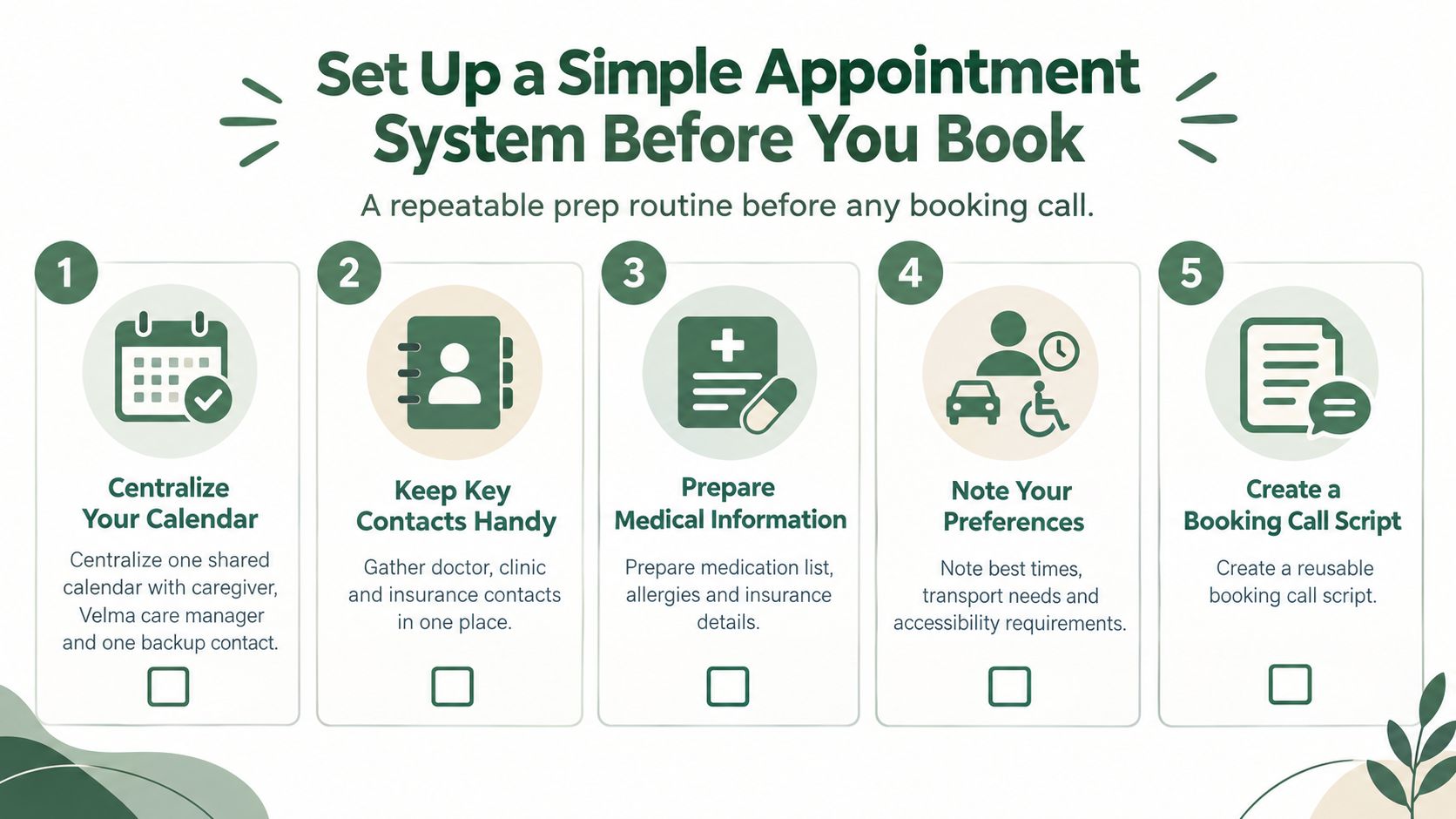
Begin with one shared calendar. Give access to the primary caregiver, the Velma care manager, and one backup family member. Use the same calendar for appointments, transportation, preparation tasks, and follow-ups. A calendar entry should include the provider, location, reason for the visit, driver, arrival instructions, and the date when someone must confirm the appointment.
Next, make a one-page patient snapshot. Keep it at the front of the medical binder and as a clearly labeled phone note. Include:
Identity: Full legal name, preferred name, and date of birth.
Coverage: Insurance provider and member details.
Health background: Primary diagnosis and major conditions.
Medication safety: Current medications with doses, allergies, and pharmacy.
Communication needs: Hearing or vision limits, preferred speaking style, and language needs.
Mobility details: Walker, cane, wheelchair, transfer support, or parking requirements.
Behavioral triggers: Long waits, rushed questions, unfamiliar staff, noise, or late-day confusion.
The snapshot prevents the caregiver from reconstructing the patient's history while a busy receptionist waits. It also gives a backup person enough information to take over without starting from zero.
Give every appointment a clear category
Use a small appointment taxonomy: routine, urgent, specialist, and procedure. Assign a default preparation period to each category based on the family's practical needs. A procedure may require transportation and fasting instructions. A specialist visit may require records or a referral. A routine visit may need only the medication list and insurance card.
Choose one person to own every scheduling call and reminder. That person doesn't have to attend every visit, but they must own the record. Create a handoff rule: if the owner is unavailable, the backup confirms the calendar entry, reads the patient snapshot, and writes down the clinic's instructions.
Families comparing digital tools can use TOOLii's guide to booking apps to understand which features may support shared coordination. For care teams that need broader family communication, a care coordination platform may offer a more suitable structure than a private calendar.
This setup takes an afternoon. It can prevent months of rescheduling, repeated explanations, and avoidable panic.
Phone Scripts That Get You the Right Slot
A booking call should sound calm, specific, and slightly repetitive. Reception staff need the essential facts quickly, and caregivers need language that prevents the request from being treated as a minor preference.
Start with identity and purpose:
“My name is [your name]. I'm [relationship] and caregiver for [patient's full name]. I'm calling to schedule a [reason for visit] appointment, and the patient has memory loss that affects waiting and communication.”
Then ask for the right time:
“Could you please offer the earliest morning appointment available? They process information best earlier in the day and become more confused during long waits or later appointments.”
That explanation matters. You're not asking for special treatment because mornings are convenient. You're describing a condition that affects whether the patient can participate in care.
Ask the office to prepare for the visit
Use direct language:
“Please flag the chart that the patient has memory loss. We'll need staff to speak slowly, limit repeated questions, and include me in the conversation.”
If the patient struggles with unfamiliar spaces, add:
“If there's a delay, could someone tell us what to expect? Surprise changes make it harder for the patient to stay oriented.”
Before leaving, ask for documentation:
“Please provide a printed visit summary, or send the instructions through the patient portal before we leave.”
If only afternoon slots are available, don't accept the first option automatically:
“I understand that's what's open. Could you check the cancellation list, the provider's least-full day, or an earlier appointment with another qualified clinician?”
If the patient isn't established with the practice:
“What records, referral details, insurance information, and caregiver authorization do you need before the first appointment? Please tell me exactly what must be sent and how you want it delivered.”
If insurance requires a referral:
“Who is responsible for sending the referral, and how will we know the office has received and processed it? Please give me the department name and a direct contact number.”
Write down the agreement before hanging up
Record the appointment date and time, provider, address, arrival time, parking instructions, transportation plan, referral status, required paperwork, cancellation policy, staff member's name, and the date of the next confirmation call. Read the details back:
“I'm going to repeat this to make sure I have it right.”
Never trust memory alone after a scheduling call. A written confirmation is part of the appointment.
Reminders, Routines, and the Day of the Visit
A phone reminder by itself is weak protection for someone with dementia. The patient may not recognize the number, may forget the message immediately, or may hear “doctor” without understanding what happens next. Reminder systems can reach patients reliably, with SMS studies reporting 97% to 99% delivery or contact success, but incorrect phone or demographic information in scheduling systems can still misroute or undermine those messages (appointment reminder systems review).
Use several modest cues instead of one loud reminder.
Build the cadence in order
At the end of the booking call, write the confirmation. Put the date, time, provider, address, parking note, what to bring, and who is driving on a printed card. Read it aloud once, then place it somewhere visible.
Make a mid-week pre-call. Verify transportation, paperwork, referral status, medication list, and any fasting or arrival instructions. Call the clinic if anything is unclear.
Give a same-morning cue. Choose the person's clearest part of the morning. Use a short sentence: “Today is your neurology appointment. I'm driving you. We'll leave after breakfast.”
Complete a verbal handoff if the usual caregiver can't attend. Tell the substitute caregiver the reason for the visit, the patient's triggers, the questions to ask, and the instructions to collect.
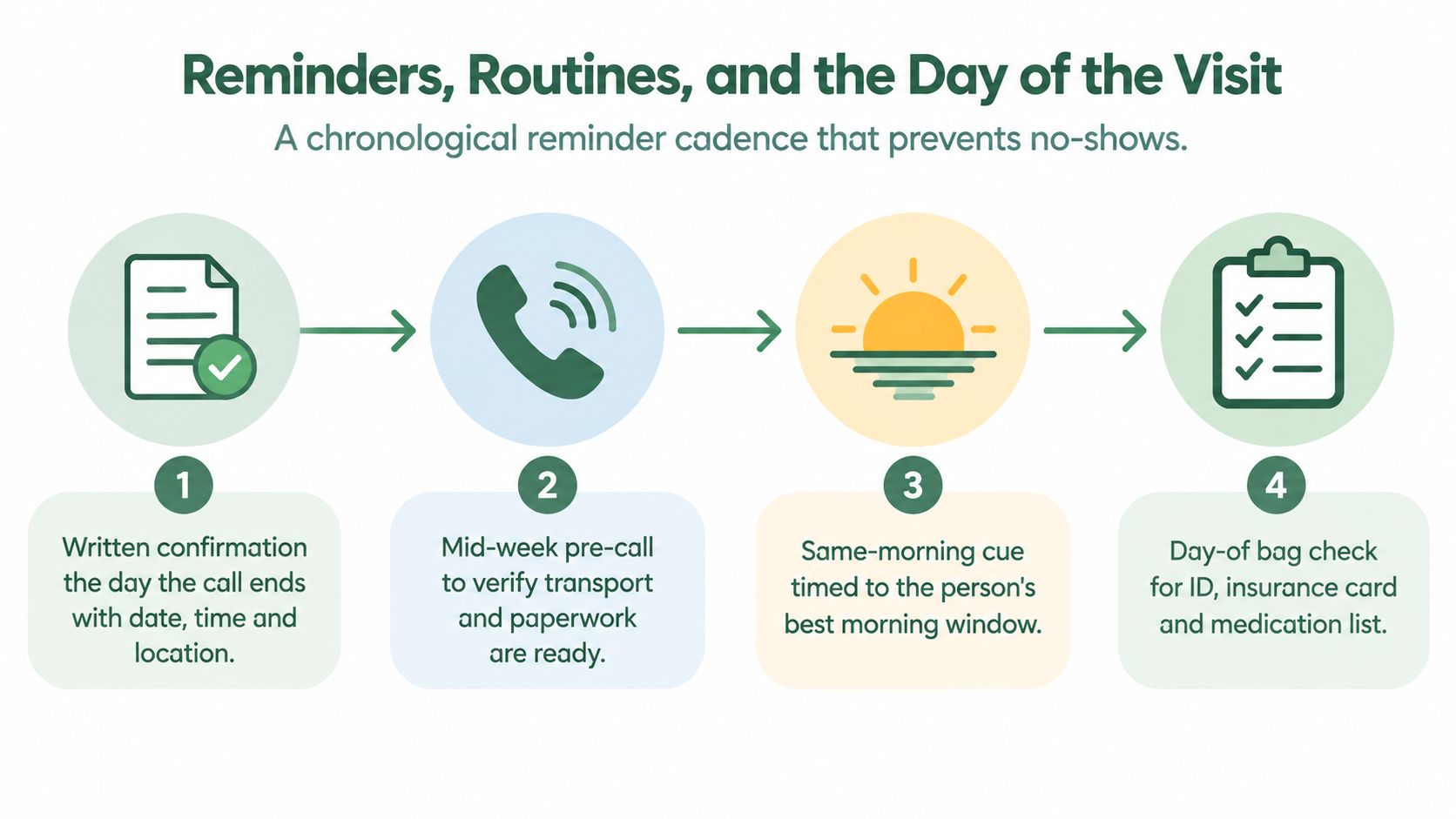
Prepare the visit bag the night before. Put in identification, insurance information, medication list, hearing aids, glasses, water, a snack if appropriate, tissues, a notebook, and a quiet fidget item. Dress for comfort rather than appearance. Arrive early enough to complete check-in without turning the lobby into a crisis.
The medication reminder guidance for seniors can help families build the same layered approach into daily medication routines.
A Velma care manager can act as the reinforcement layer between visits, making scheduled calls that re-anchor the routine, notice schedule drift, and loop in the caregiver when confusion surfaces. That support complements, rather than replaces, the family's responsibility for confirming medical instructions.
Timing Visits Around the Person's Best Window
For a person with dementia, appointment timing is a clinical decision. It affects whether they can understand questions, describe symptoms, tolerate waiting, and remember what the clinician says.
Many families use the phrase sundowning to describe increased confusion, agitation, or restlessness later in the day. Some people also have a morning clarity window, when they're more oriented and able to communicate. The caregiver usually knows this pattern better than the scheduling desk.
Book primary-care and specialist visits between 9:30 and 11:00 a.m. when possible, avoid late-afternoon slots, and don't stack two medical visits on the same day unless there's no practical alternative. A rushed morning followed by a long lobby wait can exhaust the executive function the patient needs for the actual appointment.
Ask for the provider's least-full day, not only the first available day.
Long waits are especially damaging. Recent access reporting places average U.S. primary-care waits at 31 days, while research on online scheduling found a 27.8-day gap between publicly insured and privately insured patients, with average waits of 50.4 days and 22.6 days, respectively (online scheduling access research). Those figures describe access, not the time spent in a lobby, but they show why families shouldn't treat scheduling as a neutral administrative detail.
If the office offers only a difficult time, say:
“That time is likely to produce confusion and an unsafe visit. Can you check an earlier cancellation, another clinic day, or a shorter waiting period?”
Time Window | Typical Cognitive State | Recommended Action |
|---|---|---|
Early morning | Often the clearest period for orientation and conversation | Prefer for primary care and specialist visits |
Mid-morning | Usually workable if transportation and preparation are calm | Use when the visit begins promptly |
Early afternoon | May be manageable, but fatigue and disruption can build | Accept only when the patient usually remains settled |
Late afternoon | Confusion, fatigue, and agitation may be more likely | Avoid unless clinically necessary |
Evening | Routine is disrupted and orientation may be poor | Don't schedule routine visits here |
Ask whether the office has a quiet waiting area, a check-in shortcut, or a way to call the caregiver when the clinician is ready. A better slot reduces the cognitive work the patient has to perform before care even begins.
After the Appointment, Before Things Slip
The appointment doesn't end when you leave the exam room. For dementia caregivers, the most dangerous errors often happen in the parking lot, at the pharmacy, or during the weeks before follow-up.
Four breakdowns appear repeatedly:
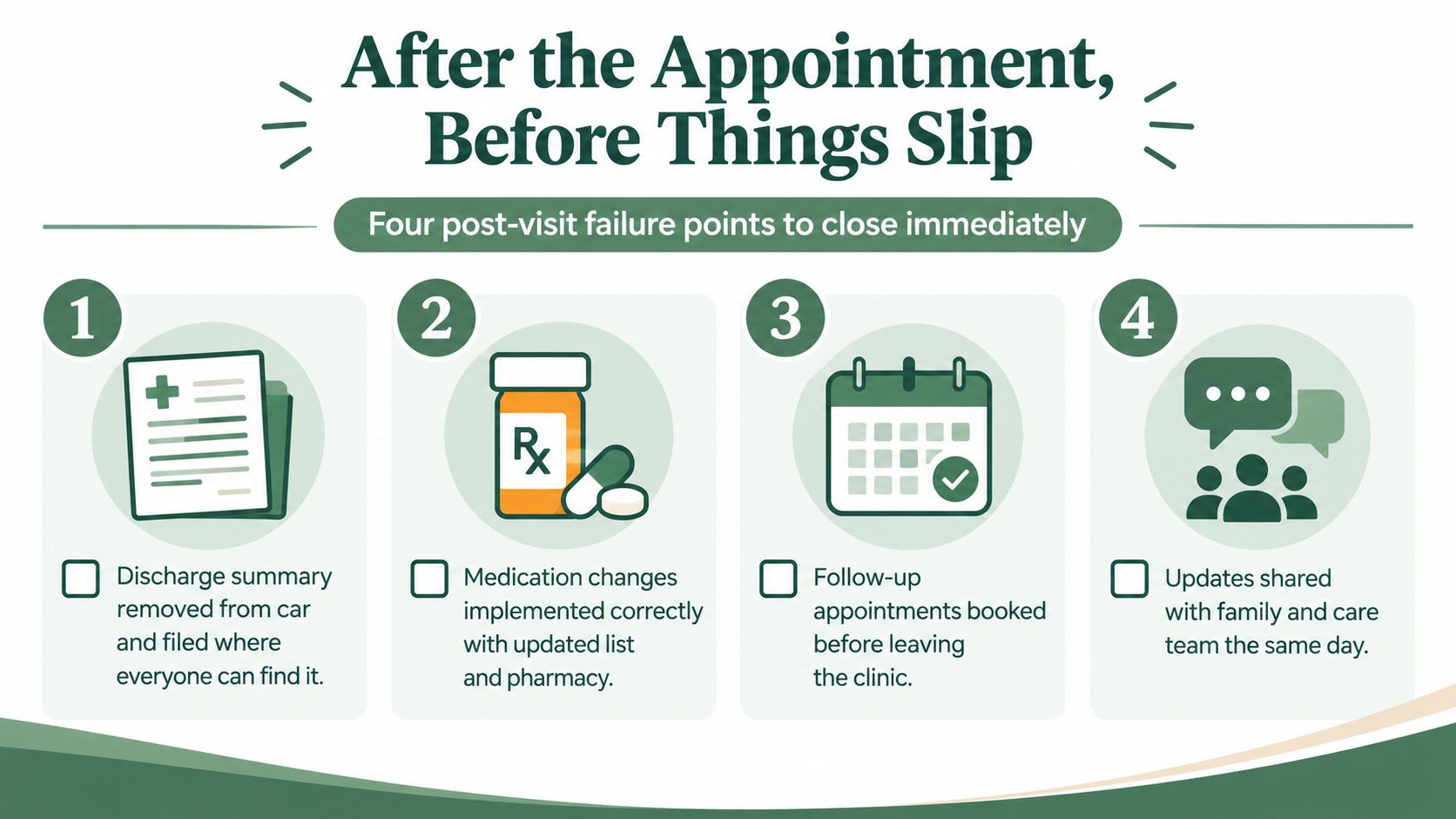
The discharge summary stays in the car. Before driving away, dictate a one-paragraph voice memo covering what the clinician said, what changed, and what happens next. File the written summary when you get home, not “later.”
A medication change gets implemented incorrectly. Photograph every handwritten instruction before leaving the exam room. At the counter, reconcile the medication list with the provider's nurse. Confirm what stops, what starts, what changes, and when the new plan begins.
A specialist's order falls between the clinic and pharmacy. Ask who is sending the prescription, referral, lab order, or imaging request. Confirm the receiving office or pharmacy has the information before assuming the task is complete.
The follow-up disappears into the future. Book it before leaving whenever possible. Add it to the shared system the same day and create a 30-day pre-due alert so the family has time to resolve transportation, referrals, or paperwork.
Questions that force clarity
Ask these before the visit closes:
What changed in the diagnosis or care plan?
Which medication starts, stops, or changes?
What symptoms require a call?
Which tests, referrals, or records are still pending?
Who is responsible for the next step?
When should the follow-up happen?
What should the caregiver do if the patient becomes more confused?
Loop in a Velma care manager when the family can't agree on the new routine, when the patient repeatedly forgets instructions, or when a follow-up depends on several people. The care manager responsibilities guide offers useful context for dividing coordination work without leaving every task with one exhausted caregiver.
The point isn't to create perfect paperwork. It's to close each handoff while the information is still fresh and before an assumption becomes a missed task.
Your One-Page Caregiver Scheduling Checklist
Keep one printable checklist in the folder that already travels to every appointment. Laminate it if that makes it easier to reuse, but don't make the design complicated. The page should reduce surprises, not demand perfect attendance.
Use these four blocks:
Before booking
Confirm the shared calendar, patient snapshot, insurance details, medication list, transportation, preferred time window, accessibility needs, and the clinic's contact information.
During the call
Use the three lines that matter most:
“I'm the patient's caregiver, and they have memory loss that affects waiting and communication.”
“Please offer the earliest morning slot and flag the chart for caregiver involvement.”
“Before we end, I need the date, time, location, preparation instructions, and next step confirmed.”
Before and on the day
Write the appointment on the printed card, verify transportation during the mid-week pre-call, give the same-morning cue during the person's clearest window, and pack identification, insurance information, medication list, glasses, hearing aids, water, and a quiet item.
After leaving
Remove and file the visit summary, photograph instructions, reconcile medication changes, confirm orders, book the follow-up, add it to the shared calendar, and set the pre-due alert. Share the update with the family and care team that same day.
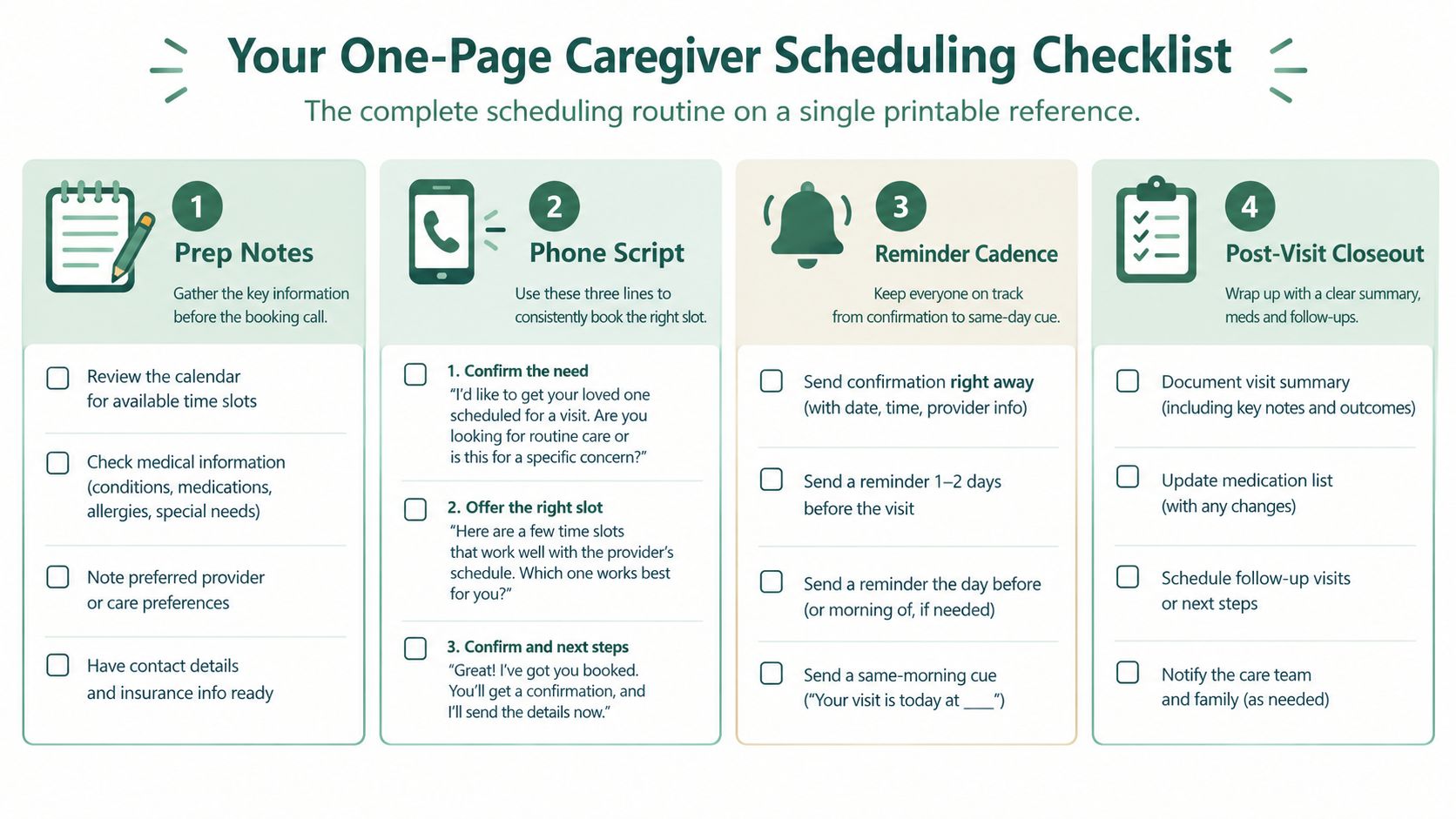
Some appointments will still be missed. Weather, illness, transportation failures, and office errors happen. A checklist can't remove every problem, but it can show whether the failure came from timing, communication, transport, paperwork, or follow-up. During check-ins, a Velma care manager can review the page, update pharmacy and emergency-contact details, and flag patterns when the same item slips more than once.
The best medical appointment scheduling system is the one that makes the next action obvious to the next person.
Velma provides scheduled phone calls, cognitive support, routine reinforcement, and care manager coordination for older adults experiencing memory loss, including practical check-ins around appointments and daily tasks. Visit Velma to see whether this kind of phone-based support fits your family's care routine.
You've driven across town with your parent, carried the medication list, checked the insurance card, and rehearsed the reason for the visit. Then the receptionist says the appointment was moved days ago. Your parent looks at you and asks why they're there.
That kind of failure feels like a scheduling mistake, but it usually isn't just one mistake. It's a cognitive-load failure involving memory, communication, transportation, waiting, paperwork, and follow-up. Medical appointment scheduling for someone with dementia has to account for how the person experiences each step, not just whether a time appears on a calendar.
Table of Contents
Why Dementia Changes the Scheduling Problem
Three forces create the breakdown
Set Up a Simple Appointment System Before You Book
Give every appointment a clear category
Phone Scripts That Get You the Right Slot
Ask the office to prepare for the visit
Write down the agreement before hanging up
Reminders, Routines, and the Day of the Visit
Build the cadence in order
Timing Visits Around the Person's Best Window
After the Appointment, Before Things Slip
Questions that force clarity
Your One-Page Caregiver Scheduling Checklist
Before booking
During the call
Before and on the day
After leaving
Why Dementia Changes the Scheduling Problem
A daughter drives 90 minutes to her father's neurologist appointment. Her father has memory loss, so she has already explained the visit several times. At the office, the receptionist checks the system and says the practice rescheduled the appointment a week earlier. Nobody reached the daughter. Her father can't explain why they came, and the unfamiliar waiting room makes him increasingly anxious.
This is why generic advice such as “set a reminder” falls short. A person with dementia may remember a phone call for a short time, then lose the information before the next conversation. A text message can arrive without becoming a usable instruction. Even a familiar appointment can disappear from working memory when another task, question, or worry takes its place.
Three forces create the breakdown
Short-term memory loss breaks the chain between contacts. The patient may forget the appointment, the reason for it, or who is driving. A reminder that exists only in a phone becomes invisible once the screen is closed.
An unfamiliar environment increases confusion. Noise, long waits, bright lights, and repeated questions can raise anxiety. Once the person becomes distressed, they may no longer be able to explain symptoms or remember what the clinician asked.
Caregivers carry dozens of small responsibilities. One missed voicemail can lead to a missed appointment. That missed visit can delay a medication change, a diagnostic conversation, or a specialist follow-up. The caregiver often notices the problem only after the chain has already broken.
Missed visits are common across outpatient care. One primary-care study of 5,604 scheduled visits found a 16.5% no-show rate, with patients most often citing forgetting the appointment and miscommunication as reasons (primary-care appointment adherence study). The solution isn't a more elaborate productivity system. It's a system that removes decisions from the patient and makes responsibility visible to the adults coordinating care.
That same principle applies at home. If nighttime wandering or unsafe movement creates another source of stress, a practical resource such as our caregiver guide to bed alarms can help families think through safety supports alongside appointment planning.
The practical rule: Schedule for the person's ability to process information, not for the convenience of the calendar.
Set Up a Simple Appointment System Before You Book
A reliable scheduling routine starts before anyone calls the clinic. If the family has to search through messages, pill bottles, and loose papers during every booking call, the process is already fragile.
Begin with one shared calendar. Give access to the primary caregiver, the Velma care manager, and one backup family member. Use the same calendar for appointments, transportation, preparation tasks, and follow-ups. A calendar entry should include the provider, location, reason for the visit, driver, arrival instructions, and the date when someone must confirm the appointment.
Next, make a one-page patient snapshot. Keep it at the front of the medical binder and as a clearly labeled phone note. Include:
Identity: Full legal name, preferred name, and date of birth.
Coverage: Insurance provider and member details.
Health background: Primary diagnosis and major conditions.
Medication safety: Current medications with doses, allergies, and pharmacy.
Communication needs: Hearing or vision limits, preferred speaking style, and language needs.
Mobility details: Walker, cane, wheelchair, transfer support, or parking requirements.
Behavioral triggers: Long waits, rushed questions, unfamiliar staff, noise, or late-day confusion.
The snapshot prevents the caregiver from reconstructing the patient's history while a busy receptionist waits. It also gives a backup person enough information to take over without starting from zero.
Give every appointment a clear category
Use a small appointment taxonomy: routine, urgent, specialist, and procedure. Assign a default preparation period to each category based on the family's practical needs. A procedure may require transportation and fasting instructions. A specialist visit may require records or a referral. A routine visit may need only the medication list and insurance card.
Choose one person to own every scheduling call and reminder. That person doesn't have to attend every visit, but they must own the record. Create a handoff rule: if the owner is unavailable, the backup confirms the calendar entry, reads the patient snapshot, and writes down the clinic's instructions.
Families comparing digital tools can use TOOLii's guide to booking apps to understand which features may support shared coordination. For care teams that need broader family communication, a care coordination platform may offer a more suitable structure than a private calendar.
This setup takes an afternoon. It can prevent months of rescheduling, repeated explanations, and avoidable panic.
Phone Scripts That Get You the Right Slot
A booking call should sound calm, specific, and slightly repetitive. Reception staff need the essential facts quickly, and caregivers need language that prevents the request from being treated as a minor preference.
Start with identity and purpose:
“My name is [your name]. I'm [relationship] and caregiver for [patient's full name]. I'm calling to schedule a [reason for visit] appointment, and the patient has memory loss that affects waiting and communication.”
Then ask for the right time:
“Could you please offer the earliest morning appointment available? They process information best earlier in the day and become more confused during long waits or later appointments.”
That explanation matters. You're not asking for special treatment because mornings are convenient. You're describing a condition that affects whether the patient can participate in care.
Ask the office to prepare for the visit
Use direct language:
“Please flag the chart that the patient has memory loss. We'll need staff to speak slowly, limit repeated questions, and include me in the conversation.”
If the patient struggles with unfamiliar spaces, add:
“If there's a delay, could someone tell us what to expect? Surprise changes make it harder for the patient to stay oriented.”
Before leaving, ask for documentation:
“Please provide a printed visit summary, or send the instructions through the patient portal before we leave.”
If only afternoon slots are available, don't accept the first option automatically:
“I understand that's what's open. Could you check the cancellation list, the provider's least-full day, or an earlier appointment with another qualified clinician?”
If the patient isn't established with the practice:
“What records, referral details, insurance information, and caregiver authorization do you need before the first appointment? Please tell me exactly what must be sent and how you want it delivered.”
If insurance requires a referral:
“Who is responsible for sending the referral, and how will we know the office has received and processed it? Please give me the department name and a direct contact number.”
Write down the agreement before hanging up
Record the appointment date and time, provider, address, arrival time, parking instructions, transportation plan, referral status, required paperwork, cancellation policy, staff member's name, and the date of the next confirmation call. Read the details back:
“I'm going to repeat this to make sure I have it right.”
Never trust memory alone after a scheduling call. A written confirmation is part of the appointment.
Reminders, Routines, and the Day of the Visit
A phone reminder by itself is weak protection for someone with dementia. The patient may not recognize the number, may forget the message immediately, or may hear “doctor” without understanding what happens next. Reminder systems can reach patients reliably, with SMS studies reporting 97% to 99% delivery or contact success, but incorrect phone or demographic information in scheduling systems can still misroute or undermine those messages (appointment reminder systems review).
Use several modest cues instead of one loud reminder.
Build the cadence in order
At the end of the booking call, write the confirmation. Put the date, time, provider, address, parking note, what to bring, and who is driving on a printed card. Read it aloud once, then place it somewhere visible.
Make a mid-week pre-call. Verify transportation, paperwork, referral status, medication list, and any fasting or arrival instructions. Call the clinic if anything is unclear.
Give a same-morning cue. Choose the person's clearest part of the morning. Use a short sentence: “Today is your neurology appointment. I'm driving you. We'll leave after breakfast.”
Complete a verbal handoff if the usual caregiver can't attend. Tell the substitute caregiver the reason for the visit, the patient's triggers, the questions to ask, and the instructions to collect.
Prepare the visit bag the night before. Put in identification, insurance information, medication list, hearing aids, glasses, water, a snack if appropriate, tissues, a notebook, and a quiet fidget item. Dress for comfort rather than appearance. Arrive early enough to complete check-in without turning the lobby into a crisis.
The medication reminder guidance for seniors can help families build the same layered approach into daily medication routines.
A Velma care manager can act as the reinforcement layer between visits, making scheduled calls that re-anchor the routine, notice schedule drift, and loop in the caregiver when confusion surfaces. That support complements, rather than replaces, the family's responsibility for confirming medical instructions.
Timing Visits Around the Person's Best Window
For a person with dementia, appointment timing is a clinical decision. It affects whether they can understand questions, describe symptoms, tolerate waiting, and remember what the clinician says.
Many families use the phrase sundowning to describe increased confusion, agitation, or restlessness later in the day. Some people also have a morning clarity window, when they're more oriented and able to communicate. The caregiver usually knows this pattern better than the scheduling desk.
Book primary-care and specialist visits between 9:30 and 11:00 a.m. when possible, avoid late-afternoon slots, and don't stack two medical visits on the same day unless there's no practical alternative. A rushed morning followed by a long lobby wait can exhaust the executive function the patient needs for the actual appointment.
Ask for the provider's least-full day, not only the first available day.
Long waits are especially damaging. Recent access reporting places average U.S. primary-care waits at 31 days, while research on online scheduling found a 27.8-day gap between publicly insured and privately insured patients, with average waits of 50.4 days and 22.6 days, respectively (online scheduling access research). Those figures describe access, not the time spent in a lobby, but they show why families shouldn't treat scheduling as a neutral administrative detail.
If the office offers only a difficult time, say:
“That time is likely to produce confusion and an unsafe visit. Can you check an earlier cancellation, another clinic day, or a shorter waiting period?”
Time Window | Typical Cognitive State | Recommended Action |
|---|---|---|
Early morning | Often the clearest period for orientation and conversation | Prefer for primary care and specialist visits |
Mid-morning | Usually workable if transportation and preparation are calm | Use when the visit begins promptly |
Early afternoon | May be manageable, but fatigue and disruption can build | Accept only when the patient usually remains settled |
Late afternoon | Confusion, fatigue, and agitation may be more likely | Avoid unless clinically necessary |
Evening | Routine is disrupted and orientation may be poor | Don't schedule routine visits here |
Ask whether the office has a quiet waiting area, a check-in shortcut, or a way to call the caregiver when the clinician is ready. A better slot reduces the cognitive work the patient has to perform before care even begins.
After the Appointment, Before Things Slip
The appointment doesn't end when you leave the exam room. For dementia caregivers, the most dangerous errors often happen in the parking lot, at the pharmacy, or during the weeks before follow-up.
Four breakdowns appear repeatedly:
The discharge summary stays in the car. Before driving away, dictate a one-paragraph voice memo covering what the clinician said, what changed, and what happens next. File the written summary when you get home, not “later.”
A medication change gets implemented incorrectly. Photograph every handwritten instruction before leaving the exam room. At the counter, reconcile the medication list with the provider's nurse. Confirm what stops, what starts, what changes, and when the new plan begins.
A specialist's order falls between the clinic and pharmacy. Ask who is sending the prescription, referral, lab order, or imaging request. Confirm the receiving office or pharmacy has the information before assuming the task is complete.
The follow-up disappears into the future. Book it before leaving whenever possible. Add it to the shared system the same day and create a 30-day pre-due alert so the family has time to resolve transportation, referrals, or paperwork.
Questions that force clarity
Ask these before the visit closes:
What changed in the diagnosis or care plan?
Which medication starts, stops, or changes?
What symptoms require a call?
Which tests, referrals, or records are still pending?
Who is responsible for the next step?
When should the follow-up happen?
What should the caregiver do if the patient becomes more confused?
Loop in a Velma care manager when the family can't agree on the new routine, when the patient repeatedly forgets instructions, or when a follow-up depends on several people. The care manager responsibilities guide offers useful context for dividing coordination work without leaving every task with one exhausted caregiver.
The point isn't to create perfect paperwork. It's to close each handoff while the information is still fresh and before an assumption becomes a missed task.
Your One-Page Caregiver Scheduling Checklist
Keep one printable checklist in the folder that already travels to every appointment. Laminate it if that makes it easier to reuse, but don't make the design complicated. The page should reduce surprises, not demand perfect attendance.
Use these four blocks:
Before booking
Confirm the shared calendar, patient snapshot, insurance details, medication list, transportation, preferred time window, accessibility needs, and the clinic's contact information.
During the call
Use the three lines that matter most:
“I'm the patient's caregiver, and they have memory loss that affects waiting and communication.”
“Please offer the earliest morning slot and flag the chart for caregiver involvement.”
“Before we end, I need the date, time, location, preparation instructions, and next step confirmed.”
Before and on the day
Write the appointment on the printed card, verify transportation during the mid-week pre-call, give the same-morning cue during the person's clearest window, and pack identification, insurance information, medication list, glasses, hearing aids, water, and a quiet item.
After leaving
Remove and file the visit summary, photograph instructions, reconcile medication changes, confirm orders, book the follow-up, add it to the shared calendar, and set the pre-due alert. Share the update with the family and care team that same day.
Some appointments will still be missed. Weather, illness, transportation failures, and office errors happen. A checklist can't remove every problem, but it can show whether the failure came from timing, communication, transport, paperwork, or follow-up. During check-ins, a Velma care manager can review the page, update pharmacy and emergency-contact details, and flag patterns when the same item slips more than once.
The best medical appointment scheduling system is the one that makes the next action obvious to the next person.
Velma provides scheduled phone calls, cognitive support, routine reinforcement, and care manager coordination for older adults experiencing memory loss, including practical check-ins around appointments and daily tasks. Visit Velma to see whether this kind of phone-based support fits your family's care routine.
Suggested Article: